Cloud Trail Service (CTS)
Product Overview
SenseCore CTS is an audit service for SenseCore's cloud products. The service monitors, records and analyzes various actions, security events, and access rights of cloud resources on the cloud platform to ensure the security and compliance of the cloud platform, and provides audit logs.
In SenseCore CTS, we define cloud trail events as important action records of users on their purchased cloud resources on the SenseCore cloud platform. Among them, cloud trail events are divided into management events, behavior events and data events. (Currently only management events and behavior events are supported)
Definitions of Events
| Term | Meaning |
|---|---|
| Events | Events refer to important behavior records of users performing some specific actions on SenseCore cloud resources by accessing and managing SenseCore cloud resources through various entrances. |
| Management Events | Management events refer to the action behavior records of users who purchase, activate and manage cloud resources related to sub-products. |
| Behavior events: Behavior events refer to various action behavior records of users using sub-products after logging in from other portals. | |
| Data events | Data events refer to action behavior records on data of users such as uploading and downloading data on the object storage service. |
Product Features
- Provide audit logs
- CTS provides action audit logs related to cloud resources and their usage.
- Enable users to filter logs by different conditions
- CTS enables users to filter the list of audit logs by event name or user name.
- Save audit logs
- CTS can store audit logs for up to 14 days.
Application Scenarios
- Compliance audit
- The compliance audit is targeted at organizations that have multiple members and use access control to manage permissions. Action audit will enable users to obtain detailed event records of each member to meet the requirements of compliance audit. Users can also create multiple audit configurations to trail different regions and event types according to responsibilities of auditors, and store audit logs in different storage spaces.
- Security analysis and problem location
- CTS will record all important actions of users on cloud resources in details. When cloud accounts or resources may have security problems, users can judge the accounts and resources through cloud audit records to determine whether there are security problems. At the same time, when important changes occur to cloud resources, the CTS enables users to quickly obtain resource changes, and quickly locate the operator who changes resources.
- When there is a problem with cloud resources or account, the CTS enables users to quickly track the problem, and obtain the action records and path of users in the account in time to quickly locate the problem.
About Billing
- Billing mode
The Cloud Trail Service is provided at no cost.
- Rules of use
Out-of-the-box solution
Operation Guide
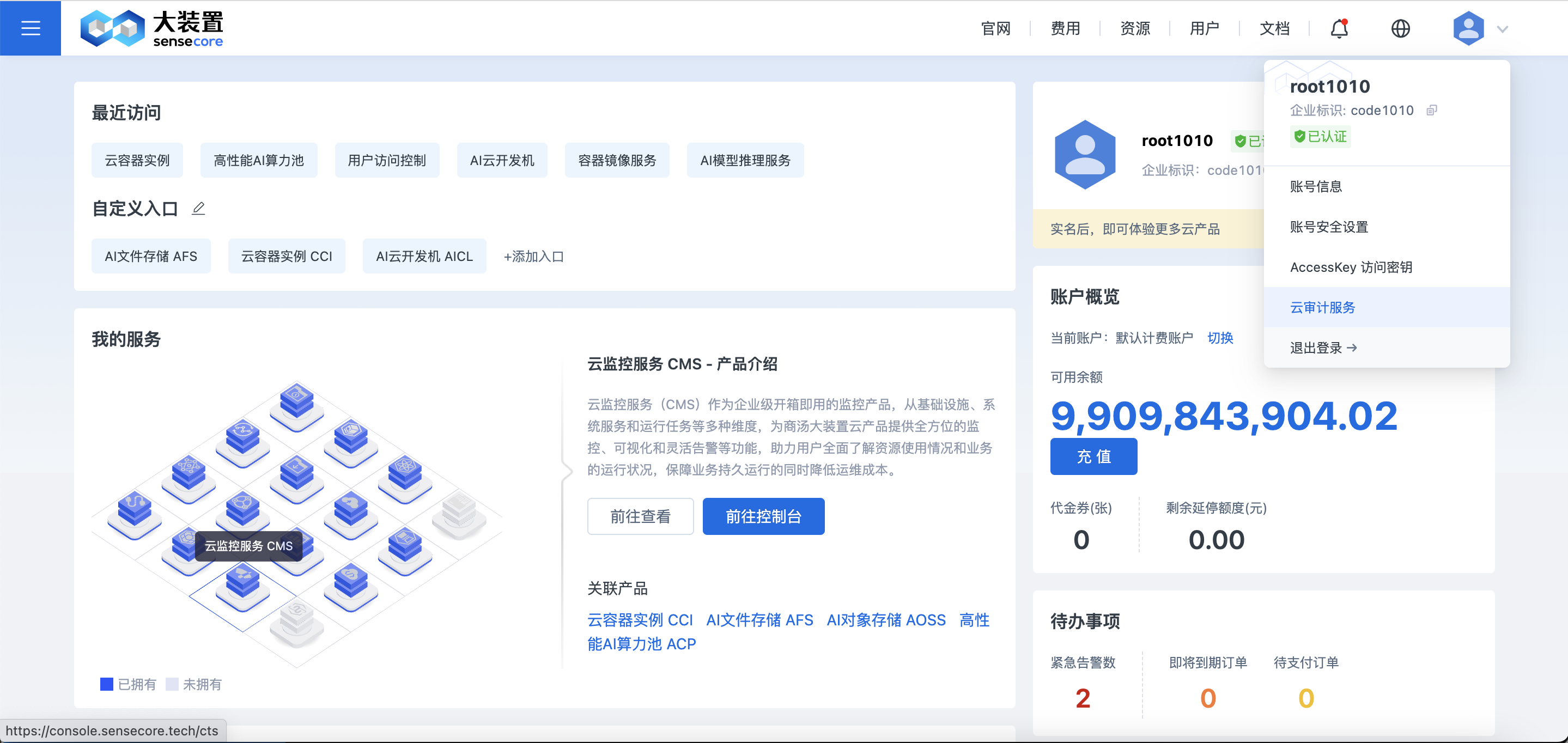
1. Entrance
The following figure shows the entrance to the CTS function
2. Activation of CTS
- The CTS is activated for management events by default.
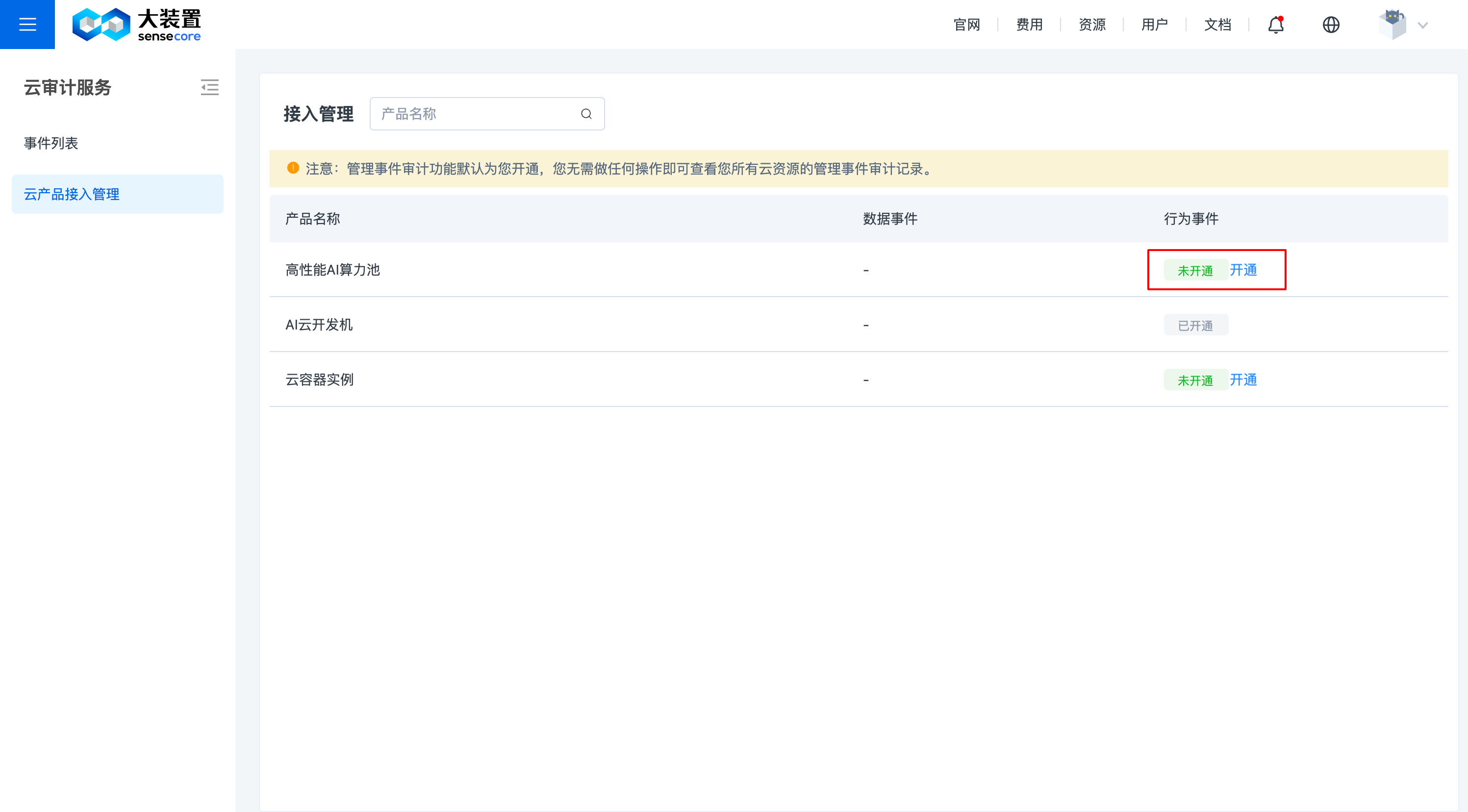
- For behavior events, users need to activate the CTS function on the [Cloud Product Access Management] page as required by sub-products. The behavior audit for different sub-products shall be individually authorized on the CTS by users.
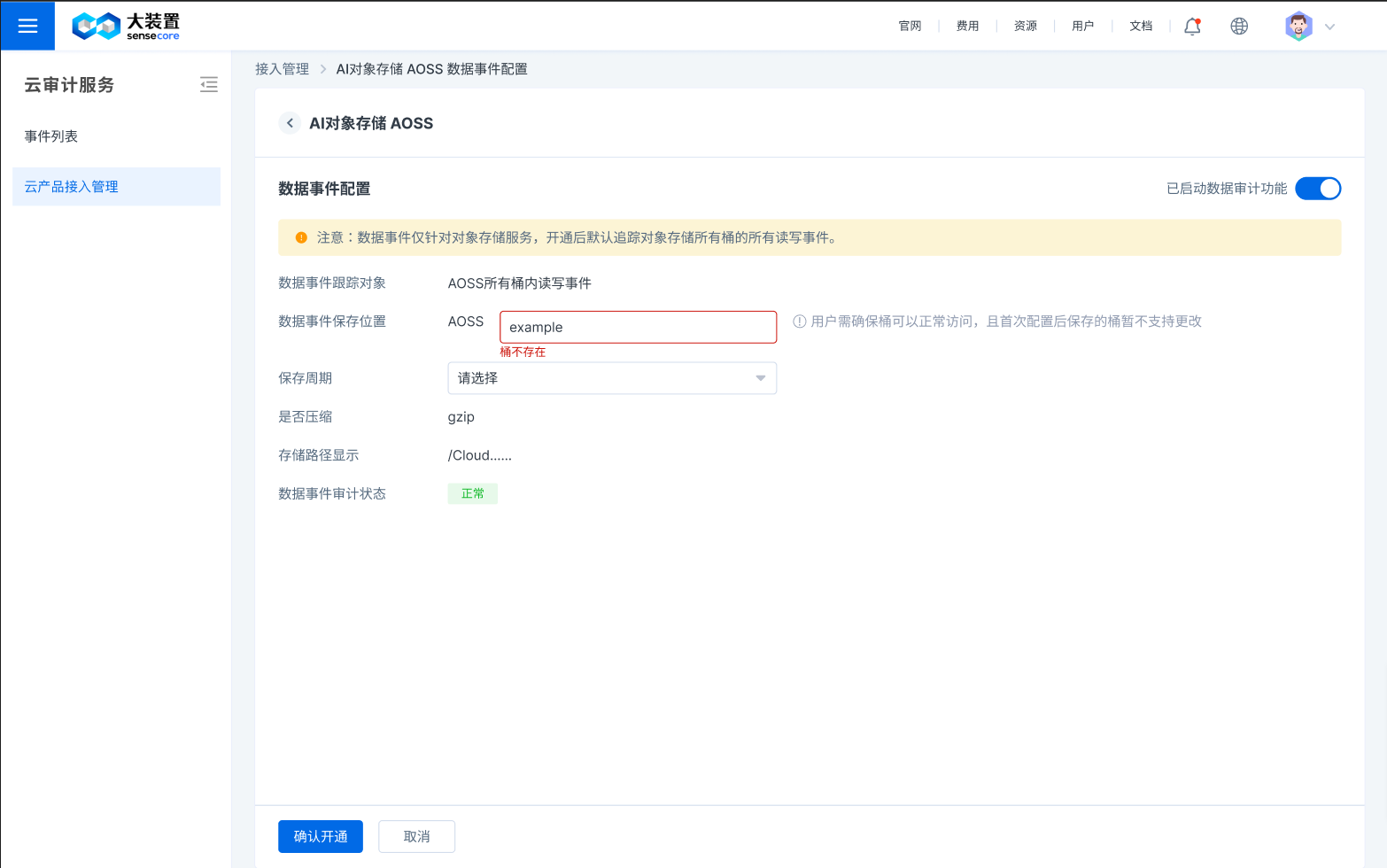
- Data events only apply to the AI object storage service (AOSS) and need to be activated once. The storage information needs to be configured during activation. After the configuration is complete, the function is activated and takes effect.
- Data events can be closed. The trail functionality stops after data events are closed but data events are still [Activated]. The configuration keeps unchanged after data trail is enabled.
3. Authorization and activation of behavior events
Notes
- Cloud Lab: Accessing behavior events will make the access entrance of code server, jupyterlab, and ssh address unavailable. In order to ensure that behavior data of the Cloud Lab instance is normally audited, please stop the running Cloud Lab and save the relevant data and environment.
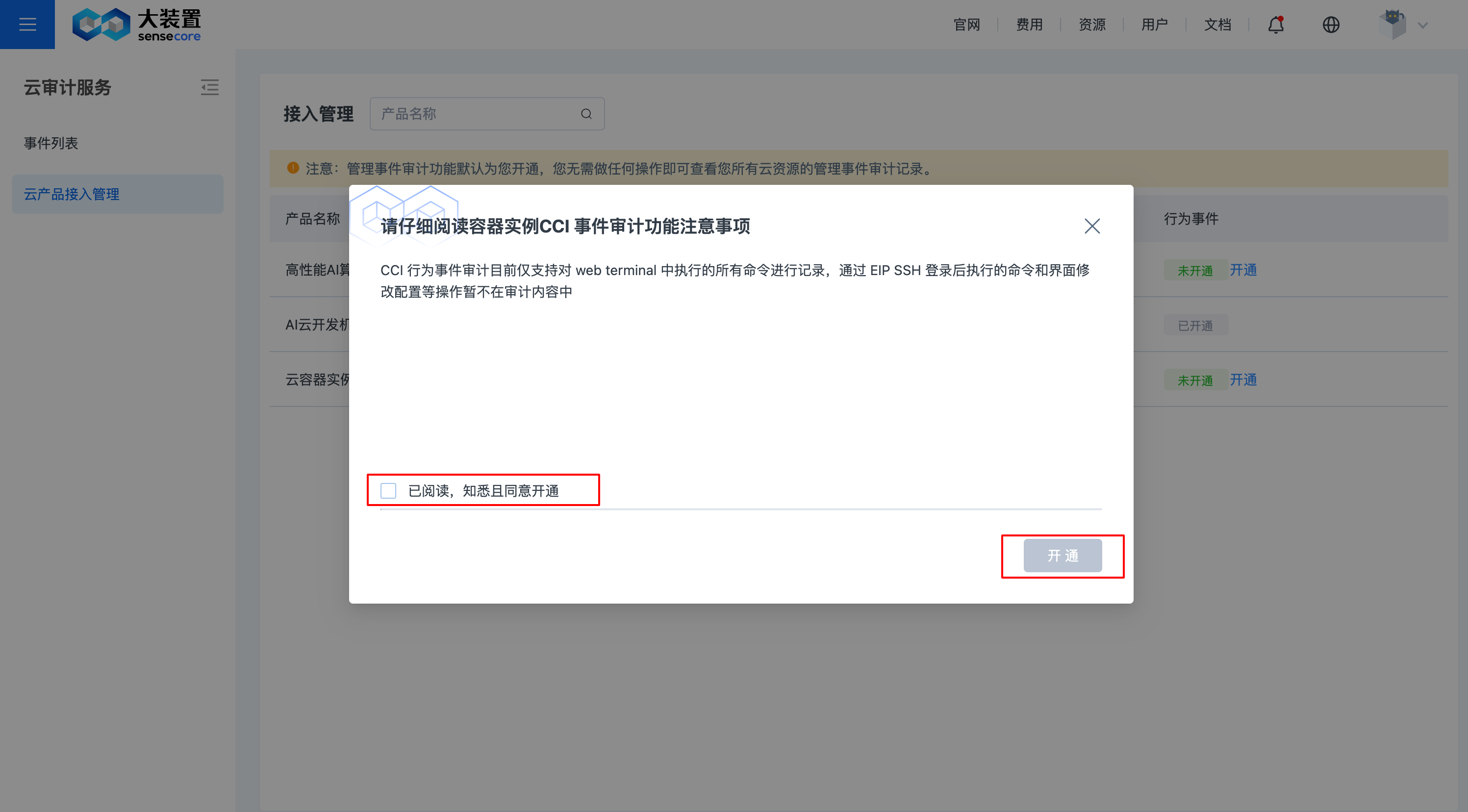
- The CCI behavior event audit can only record all commands executed on the Web terminal. Commands and actions such as on-screen configuration modification after login with EIP SSH will not be included in audit contents.
- Click "Activate" next to the sub-product for which behavior event will be activated, click "Authorize" and click "OK" to activate it.
4. Authorization and activation of data events
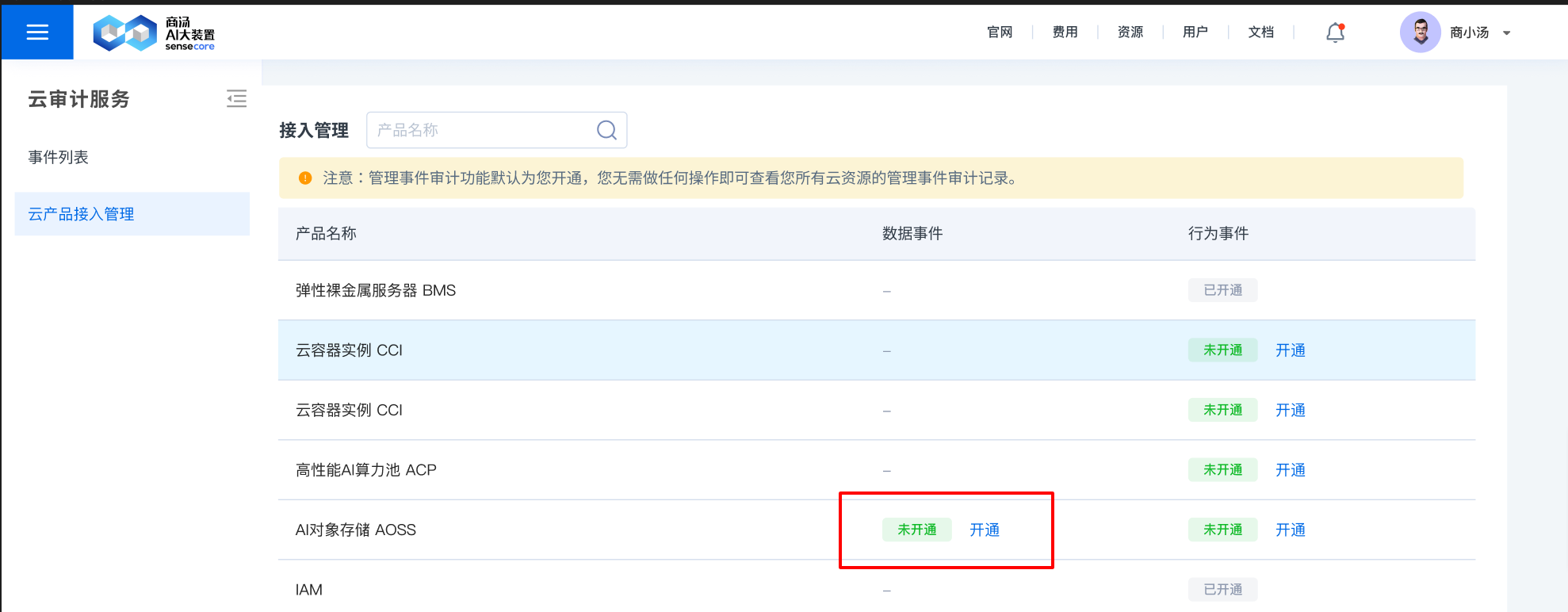
- Click "Activate" next to the sub-product for which data event will be activated, click "Authorize" and click "OK" to activate it.
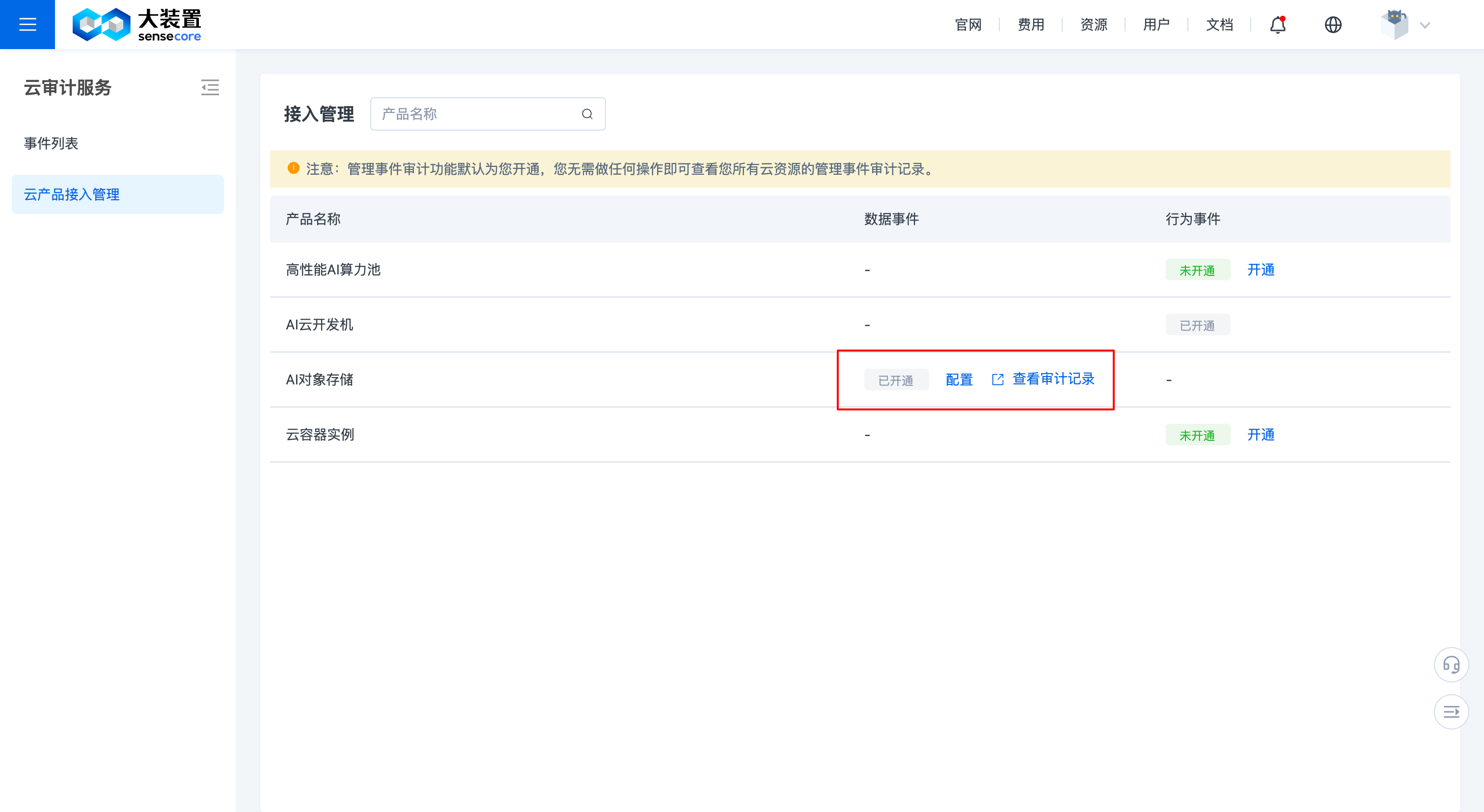
- After activation, click to go to AOSS to view the trail record file.
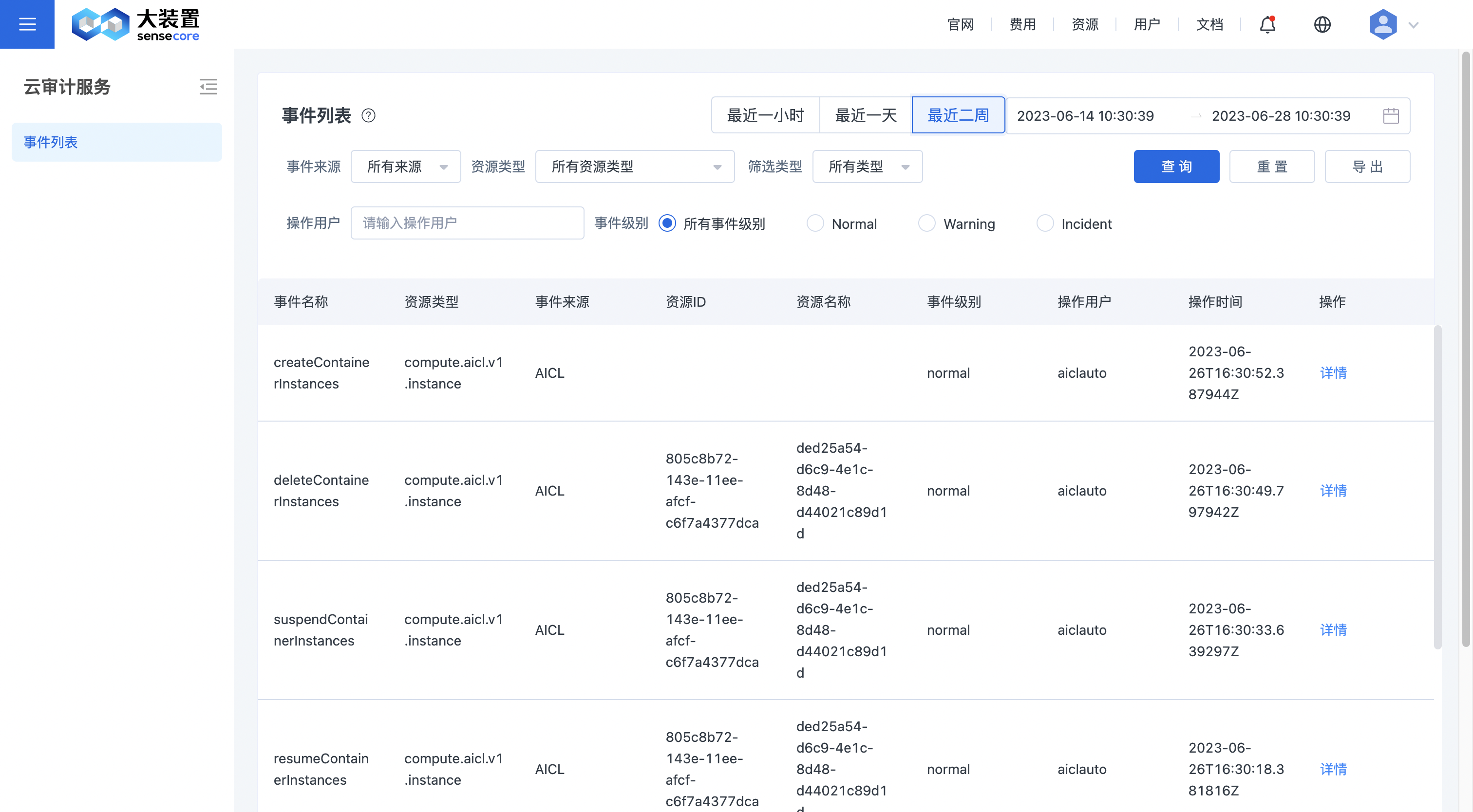
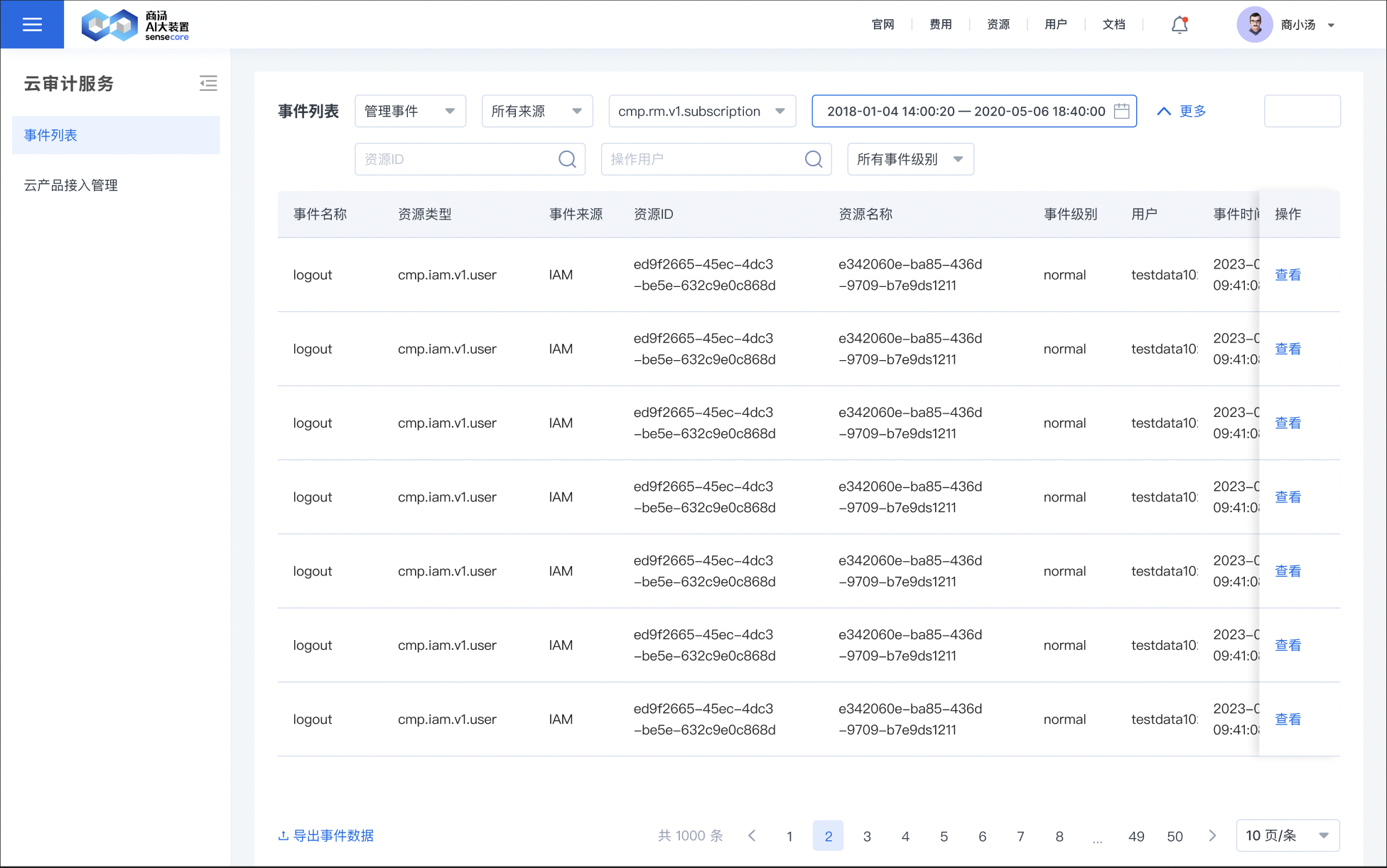
5. Audit logs List
6. Example of audit log details
| Event Information Name | Meaning of event information |
|---|---|
| Event Name | Name of an event |
| Resource Type | Type of the resource of an event |
| Event Source | Name of cloud product from which an event is sourced |
| Resource ID | The ID of a resource |
| Event Level | Event levels include normal, warning, incident. Normal indicates that this action succeeds; warning indicates that this action fails' and incident indicates that this action has caused more serious consequences than failure, for example, resulting in node failure or user service failure. |
| Operator | The name of the user who performs the action |
| Action Time | The exact time when the action occurs |
| Event Details | A detailed record of event code snippet. For details, see below |
Event details:
{
    "time":"2023-06-20T03:08:22.943592939Z"
    "user":{
        "user_id":"a51b3495-3ba1-4add-b760-3d257e299f37"
        "tenant_id":"c28f173a-8f18-474c-866b-4ce89a612958"
        "user_name":"root1010"
        "tenant_code":"code1010"
    }
    "request":{
        "user":{
            "id":"a51b3495-3ba1-4add-b760-3d257e299f37"
            "name":"code1010"
            "source":"build_in"
            "status":"valid"
            "username":"root1010"
            "mfa_state":"disabled"
            "tenant_id":"c28f173a-8f18-474c-866b-4ce89a612958"
            "user_type":"admin"
            "create_time":"2022-10-10T09:43:03.746624Z"
            "tenant_code":"code1010"
            "update_time":"2023-06-20T03:06:58.197327Z"
            "console_state":"enabled"
            "open_api_state":"disabled"
            "credential_type":"bcrypt"
            "last_login_time":"2023-06-20T03:06:58.197324Z"
            "set_password_time":"2023-04-18T10:41:19.830267Z"
            "password_updator_id":"00000000-0000-0000-0000-000000000000"
            "set_password_next_login":"disabled"
            "set_password_first_login":"enabled"
            }
        "challenge":"7d9097e8d8ee4986a739236ee70aa49b"
    }
    "event_id":"cdc8bc02-bf37-49a7-8a09-4ac346ed08f5"
    "response":{
        "id":"00000000-0000-0000-0000-000000000000"
        "action":"login"
        "object_id":"a51b3495-3ba1-4add-b760-3d257e299f37"
        "tenant_id":"c28f173a-8f18-474c-866b-4ce89a612958"
        "create_time":"2023-06-20T03:08:22.940141673Z"
        "object_name":"root1010"
        "object_type":"user"
        "operator_id":"a51b3495-3ba1-4add-b760-3d257e299f37"
        "tenant_code":"code1010"
        "action_result":true
        "operator_username":"root1010"
    }
    "source_ip":"10.165.96.50"
    "event_type":"ConsoleAction"
    "api_version":"v1.0"
    "record_time":"2023-06-20T03:08:22.946822084Z"
    "event_rating":"normal"
    "service_type":"IAM"
    "resource_type":"cmp.iam.v1.user"
    "operation_type":"login"
}
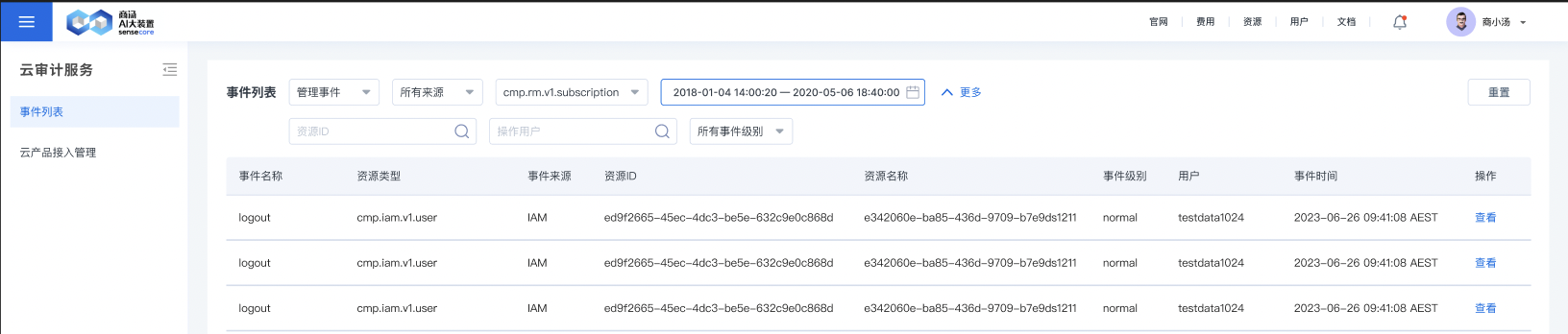
7. Audit log filter
Users can filter audit logs by the following conditions in CTS:
| Filter Criteria | Overview of criteria |
|---|---|
| Filter by Event Source | Filter events by the name of the sub-product to which event source belongs |
| Filter by Resource Type | Filter events by event resource type |
| Filter by Event ID | Filter events by event ID |
| Filter by Operator Name | Filter events by username |
| Filter by Event Level | Filter by importance level of events, including normal, warning, and incident |
| Clear and Reset Query Criteria | Clear set query criteria with one key |
as shown in the figure:
8. Cloud Lab - View the sendSSHInstruction behavior event
Download trail event files:
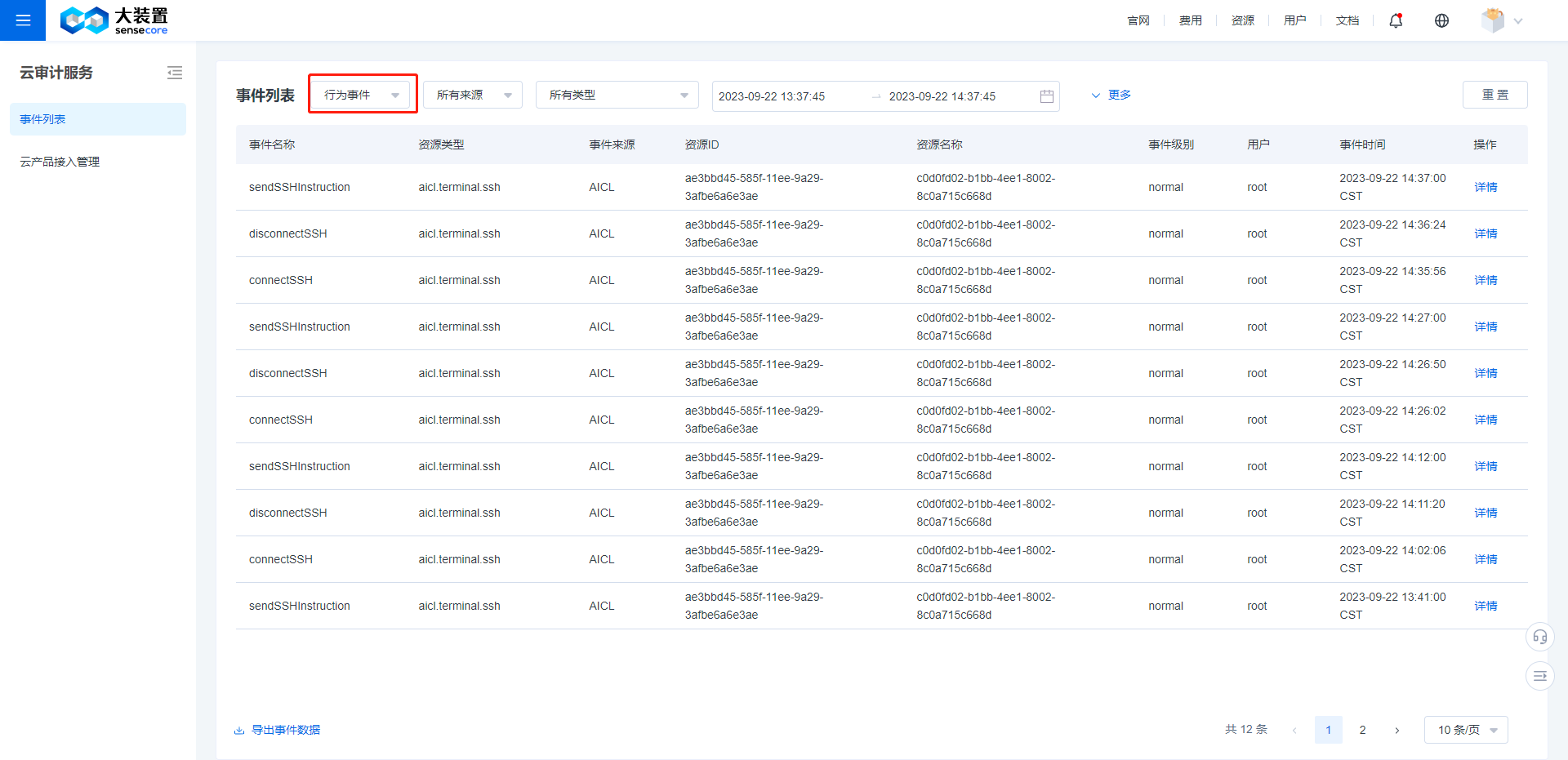
- On the "Cloud Trail Service" management page, switch event type from "Management Event" to "Behavior Event":
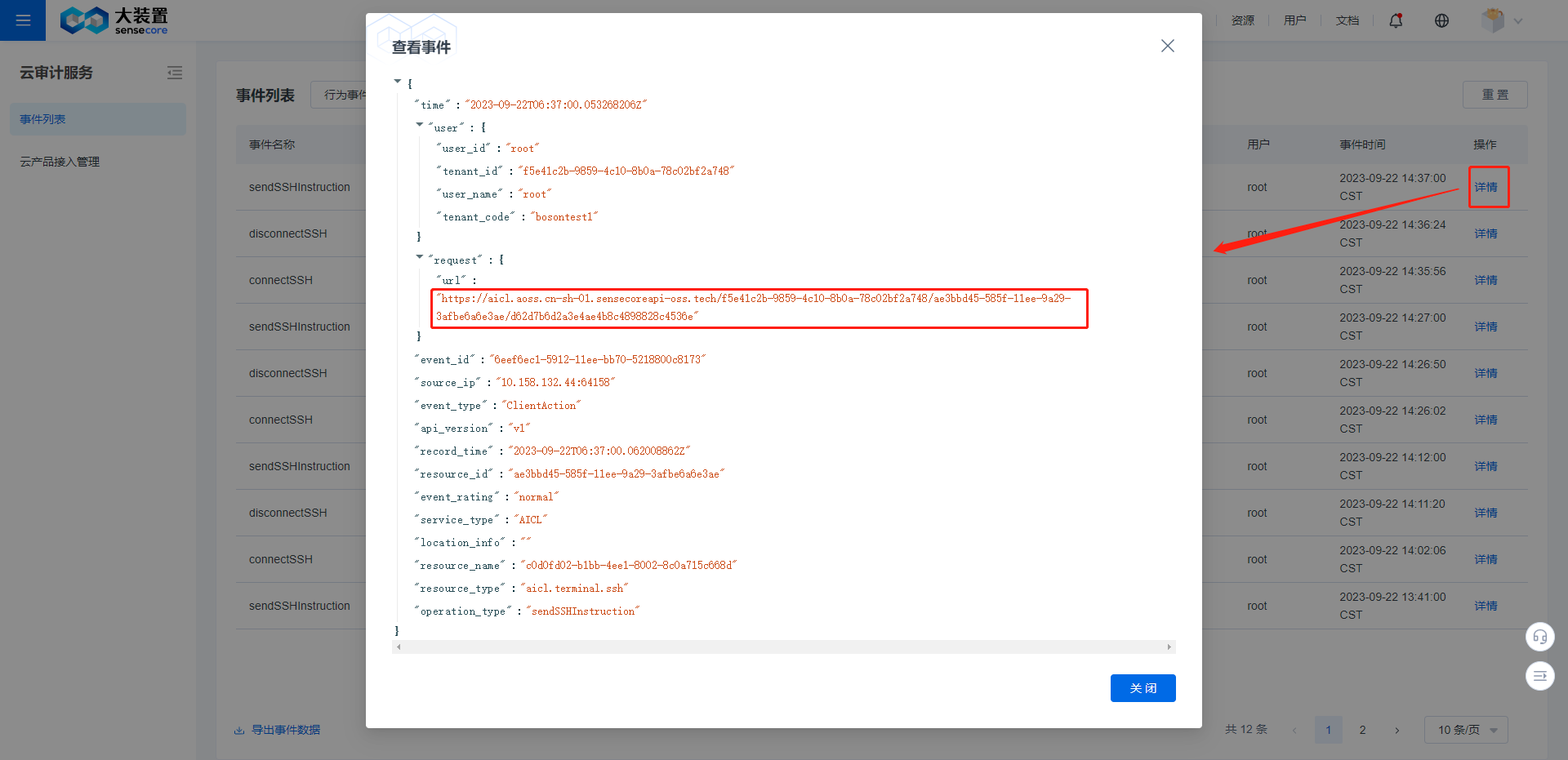
- Locate the behavior event named "sendSSHInstruction", click [Details], copy the request-url field to your browser and download the file
- On the "Cloud Trail Service" management page, switch event type from "Management Event" to "Behavior Event":
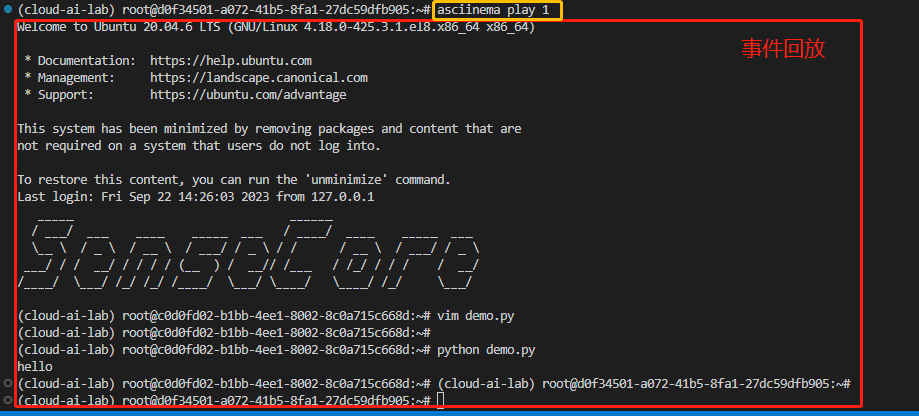
Install the viewing tool asciinema by referring to the document: asciinema Installation Instruction
Run the following command to view the event
asciinema play filepath #Replace filepath with the address of the behavior event file