Elastic IP (EIP)
Product Overview
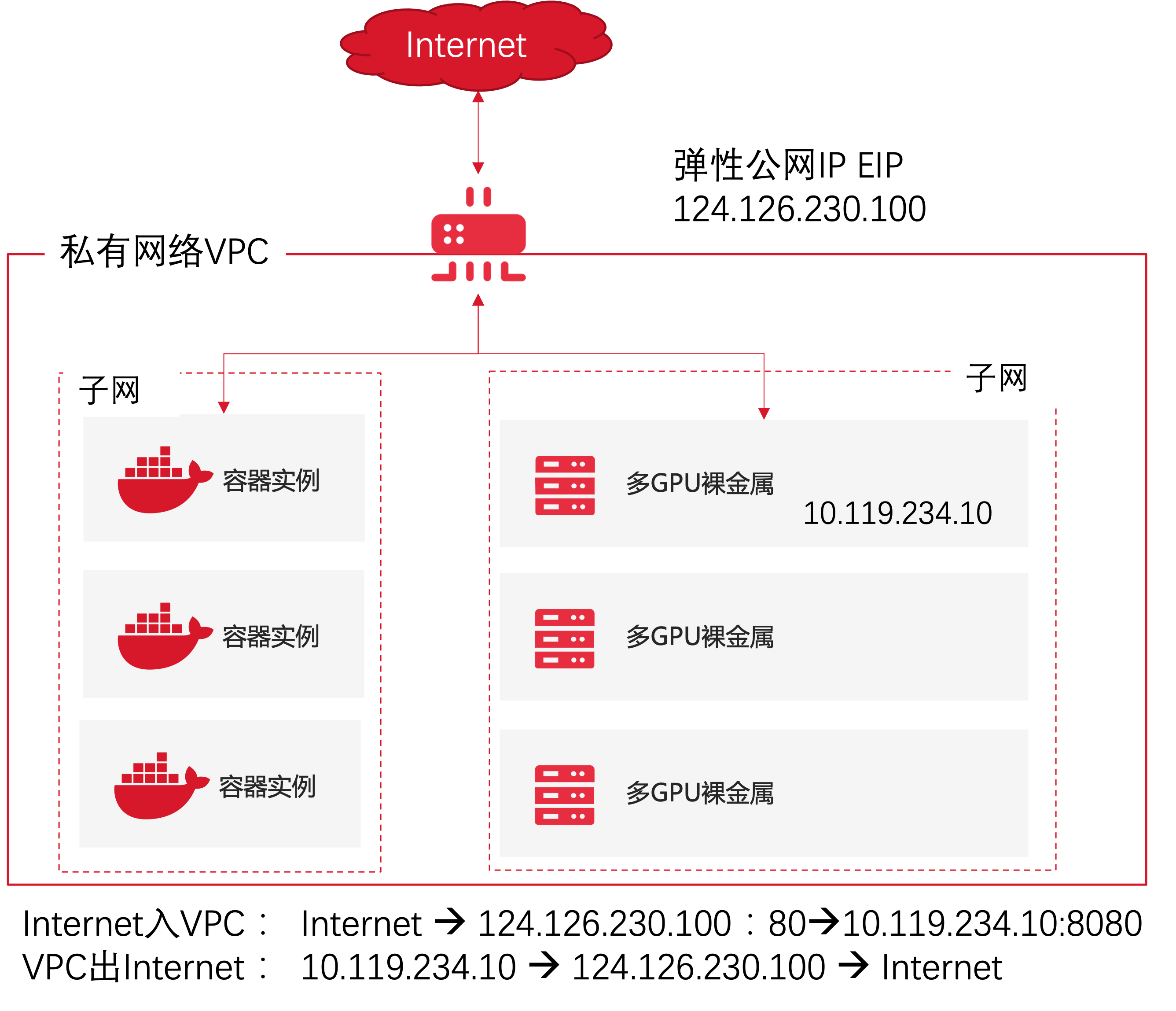
The Elastic IP (EIP) service provides public IP addresses and Internet bandwidths, which, through the network address translation (NAT) technology, meets the needs of various resources such as bare metal and development machines in the tenant's virtual private cloud (VPC) to communicate with the Internet.
Application Scenarios
- It provides the capability for the resources in the VPC to access the Internet. After an EIP is created, the resources in the VPC access the Internet using the public IP and public bandwidth corresponding to the EIP.
- The services deployed by the instances such as bare metal in the VPC are exposed to the Internet to provide services to the Internet.
Product Superiority
- Supports multi-operator dynamic BGP access, so that different operators can communicate with each other with low latency.
- Multi-line high availability: The high-availability underlying network solution eliminates SPoFs, providing stable network connection.
- Elasticity and flexibility, for on-demand bandwidth configuration changes, easy to bind and unbind rules with multiple resources.
About Billing
Each EIP contains a fixed public IP address and bandwidth specified by the user, and the standard product price can be checked in the console.
Quick Start
For bare metal, containers and various resources on the cloud, all use private IP addresses by default and cannot communicate with the Internet, an elastic IP provides a unique public IP and bandwidth resource in the Internet, and by configuring an elastic IP, you can achieve access of resources on the cloud to the Internet and the ability to publish service portals to the Internet based on the resource on the cloud.
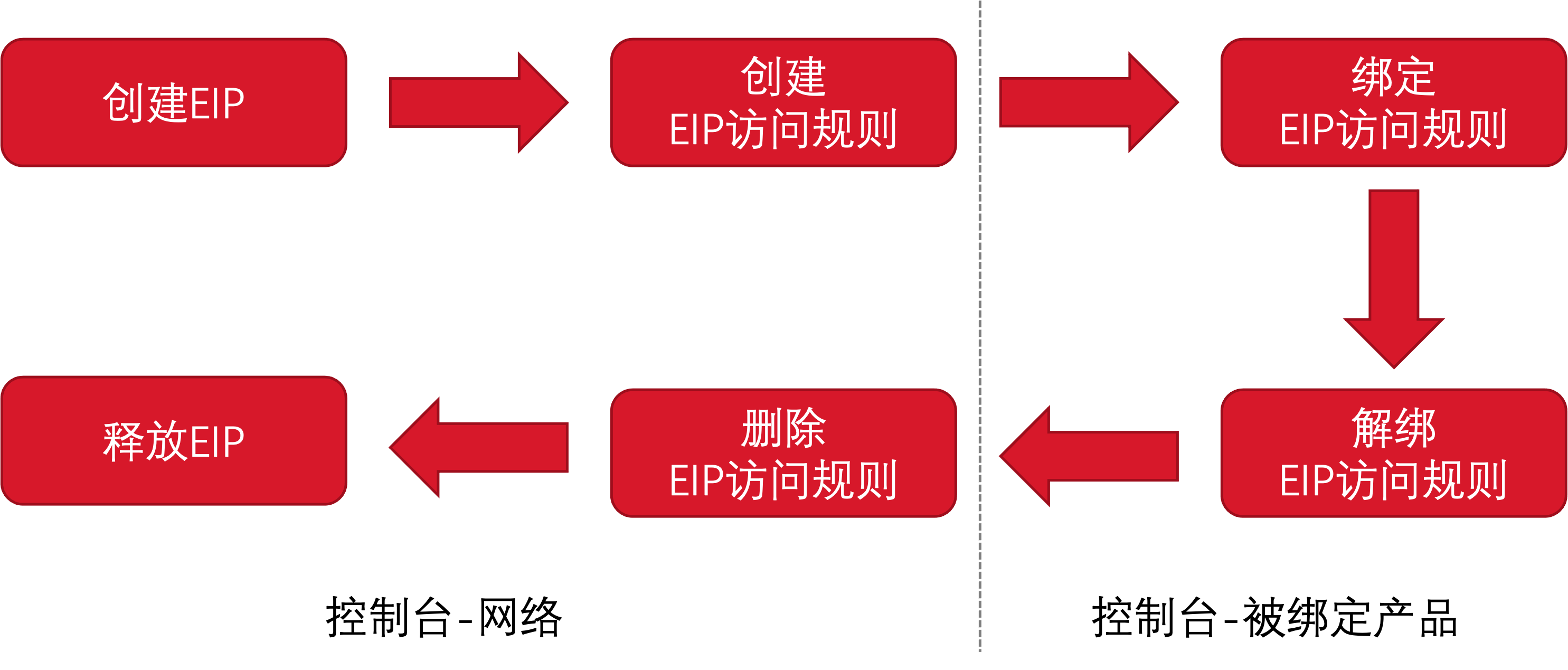
The user can create an elastic IP (EIP) on demand and specify its bandwidth. After the EIP is created, that is, after Step 1 in the figure below is completed, the resources in the VPC can use the fixed public IP address assigned to the EIP and the bandwidth specified by the user to access the Internet.
When the resources in the VPC want to provide services to the Internet, the user needs to create EIP destination network address translation (DNAT) rules and specify the destination network. After the configuration of which is completed, the Internet can access the services deployed in the VPC through EIP:<port, protocol in the EIP access rules>.
Deleting the EIP access rules, and deleting EIP are the corresponding reverse operations processes, wherein EIP access rules can be deleted when no resource is bound.
Operation Guide
Create an Elastic IP (EIP)
After an EIP is created, the instances in the VPC will always use the public IP address and bandwidth of the EIP to access the Internet.
The default number of EIPs per tenant is limited to 10.
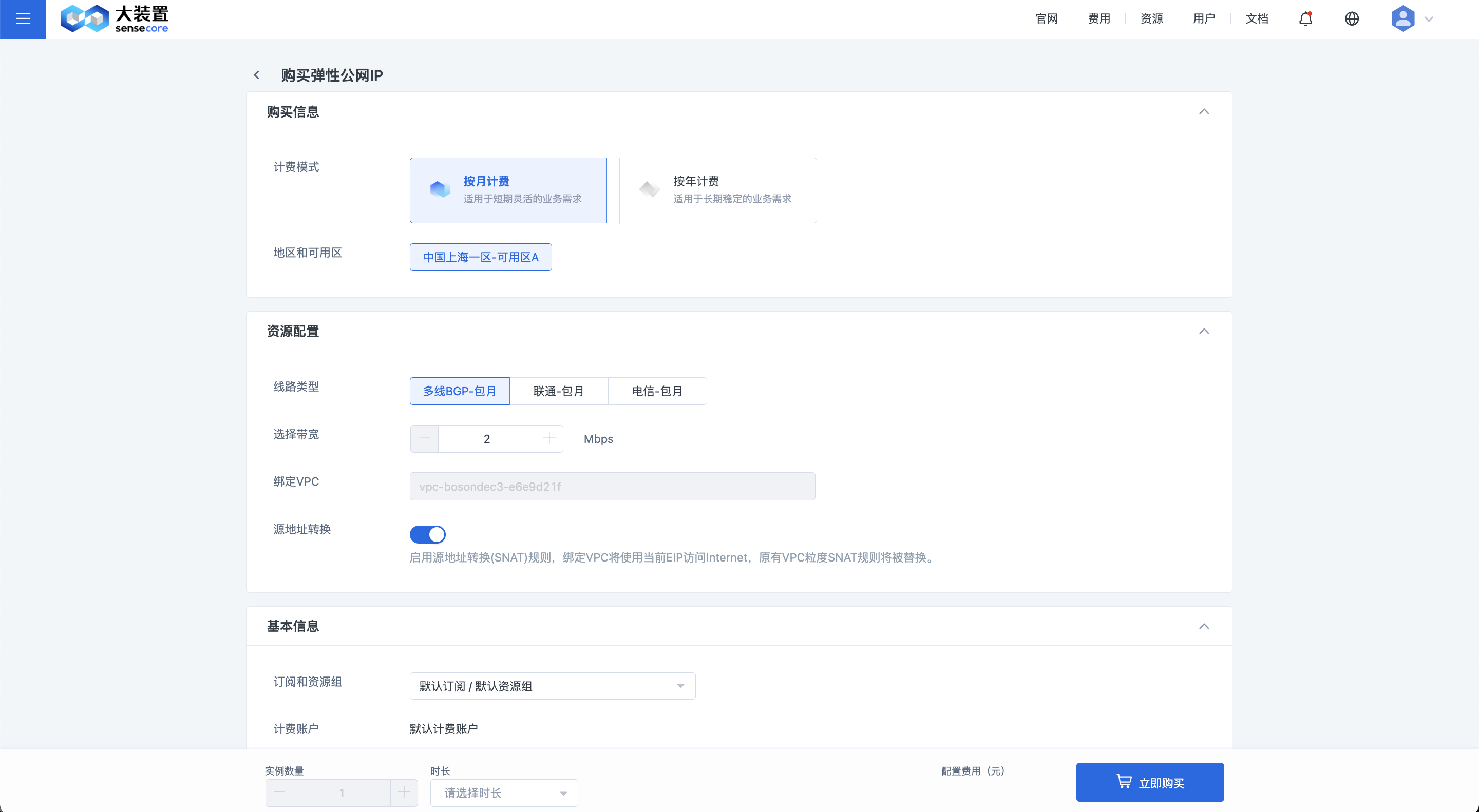
Create an EIP based on the following information:
| Configuration | Description |
|---|---|
| Billing Mode | Select monthly subscription or another billing mode as needed |
| Region and Availability Zone | Select the region and availability zone of the EIP |
| Line Type | Select multi-line BGP, Unicom, or Telecom as line type |
| Select Bandwidth | Configure the public bandwidth of the EIP as needed, and provide the same public bandwidth for the uplink and downlink of the EIP charged by fixed bandwidth |
| Bind VPC | The EIP will be bound to the Internet gateway of the selected VPC, providing Internet access and the function to expose services to the Internet for instances in the VPC |
| Source Network Address Translation | Enable or disable source network address translation (SNAT) rule. If the Source Network Address Translation rule is enabled, the bound VPC will use the current EIP to access the Internet, and the SNAT rule of the original VPC will be replaced |
| EIP Name | Name of EIP instance, use a manageable EIP instance name |
| Subscription and Resource Group | Assign the instance to a specific subscription and resource group, which can be combined with IAM permissions to achieve group management of resources |
EIP Instance Management
After the EIP instance is successfully created, you can view the name, resource ID, IP address, bandwidth and other information of the EIP in the Elastic IP (EIP) console. Flexibly manage the bandwidth capacity and lifecycle of the EIP through configuration change, renewal and release. Click on the EIP name to enter the EIP Details page and view more information.

EIP Bi-directional Bandwidth Rate Limiting
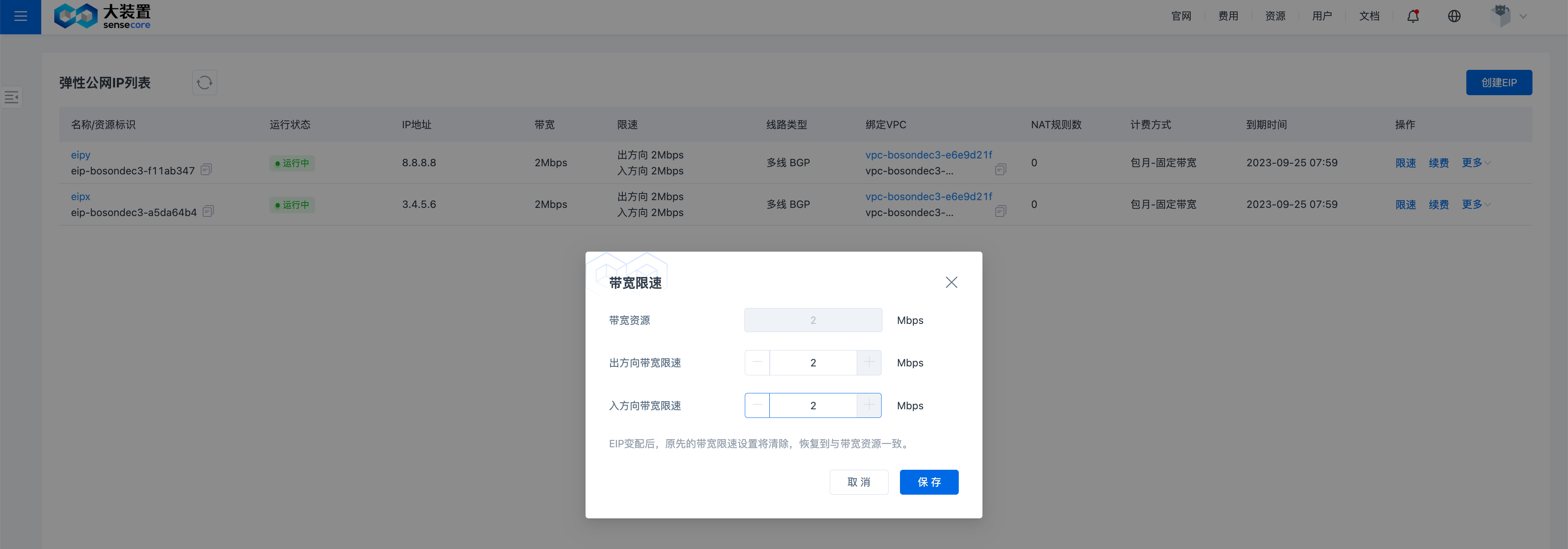
After purchasing EIP bandwidth resources, you can set rate limit for inbound and outbound bandwidth to meet the specific use requirements.
- Outbound: From the Intranet to the Internet.
- Inbound: From the Internet to the Intranet.
Rate limit value in Mbps. The minimum value is 1 and the maximum value shall not exceed the available bandwidth resource in a step size of 1.
Note: When the EIP configuration changes, the original bandwidth rate limit setting will be cleared and restored to the available bandwidth resource.
EIP whitelist Access Control
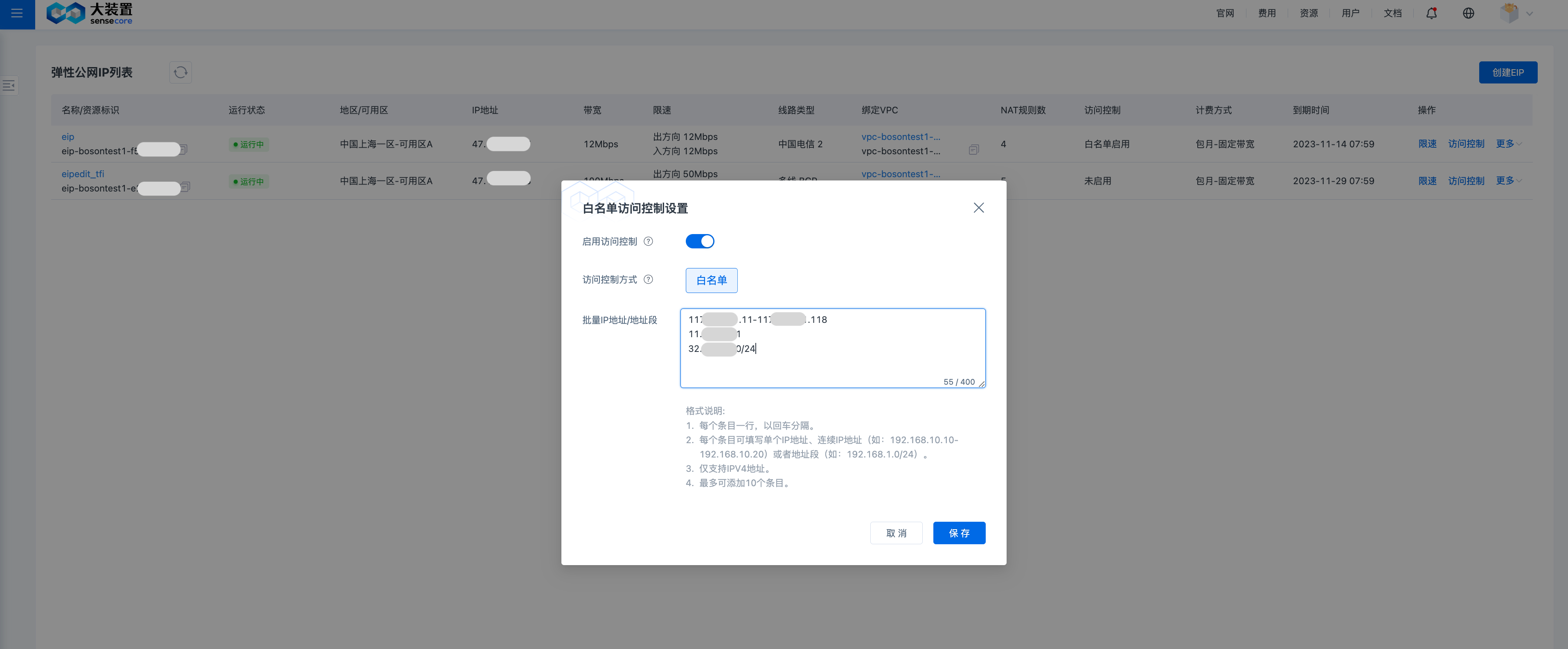
After enabling the EIP whitelist access control, users can implement access control in the inbound direction by setting the external IP whitelist.
Create EIP Address Translation Rules
- The EIP converts the private network addresses of resources on the cloud to EIP addresses and Internet communications through address translation rules. After the current EIP is bound to a private network VPC, the source network address translation (SNAT) rules for accessing the Internet are provided to the instances in the VPC by default, and the instances in the VPC can access the Internet through the public address and bandwidth of the EIP to perform activities such as resource download.
Note: The VPC can only be bound to the source network address translation (SNAT) rule of a single EIP. When a new EIP is created, enabling "source network address translation" will overwrite the original SNAT rule. The EIP with the source network address translation enabled can be modified on the VPC Details page.
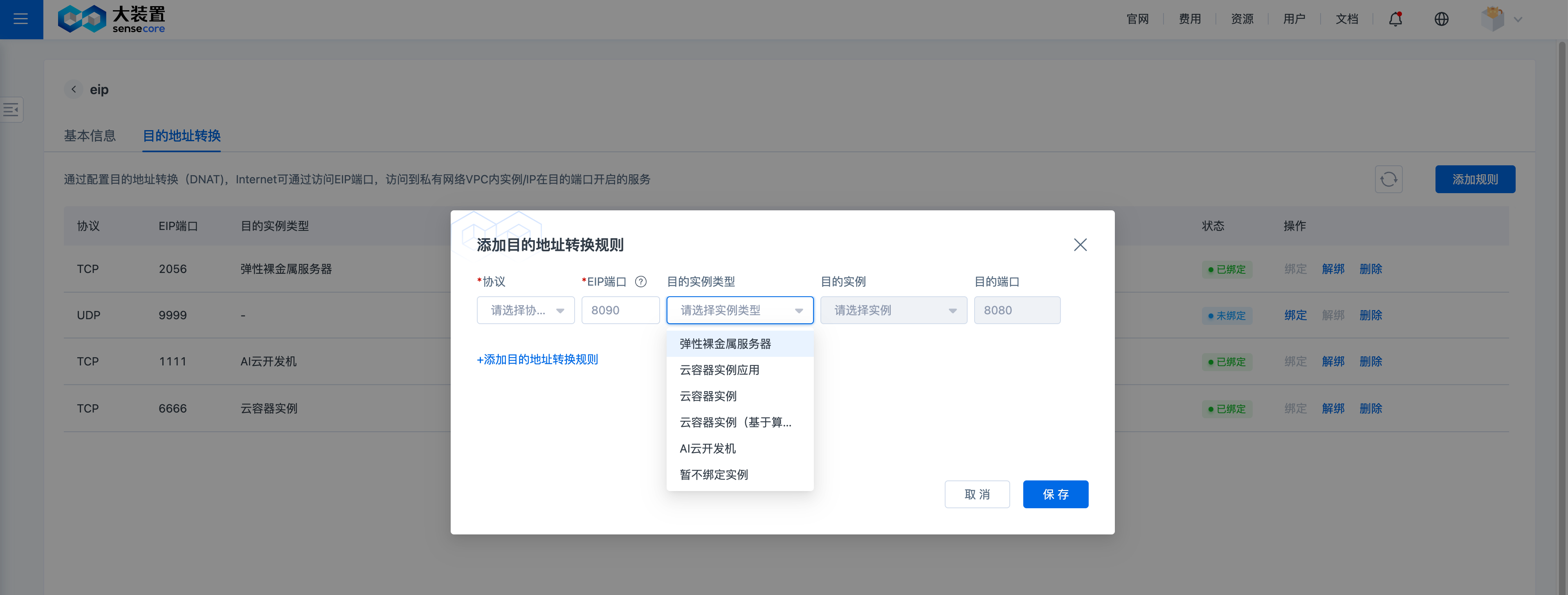
- If you need to publish the services on the instances in the VPC to the Internet, it is necessary to configure the destination network address translation (DNAT) rules, which include the protocol, EIP port, destination instance, destination instance port and other information, as shown in the figure below, after completely filling in the information, you can publish the services in the private network to the Internet, such as SSH-based management services, FTP data services, etc.
| Configuration | Description |
|---|---|
| Protocol | Select the TCP or UDP protocol according to the services provided by the instance bound to the EIP access rule plan |
| EIP Port | Configure the port for receiving Internet access requests as an integer within 1-65535. For management services, it is recommended to expose larger port numbers, and the direct use of 22 and 3389 is not recommended |
| Destination Instance Type | Select the types of instances that provide real services on demand, including BMSs, CCI applications, CCIs, CCIs (based on the compute pool), and AICLs |
| Destination Instance | Select the instances that provide real services on demand |
| Destination Port | The listening port of the destination instance, such as the SSH service of the Linux server, usually Port 22 |
The information related to the destination instance can also be obtained through the operation of binding the destination instance after the creation of rules, which is recommended to be completed together with the creation.
Bind/Unbind EIP Destination Network Address Translation Rules
If the information related to the destination instance is not specified when the EIP destination network address translation rules are created, you can select the relevant instance through the Bind button to supplement it. Unbinding the EIP destination network address translation rules will lead to an “unbound” state, and the requests received by the EIP port will be deemed invalid because no service is provided by the real destination instance. The operation of unbinding and rebinding destination network address translation rules to a new destination instance has the same effect as the operation of deleting and recreating the rules entirely.
Delete an EIP
When users no longer need the EIP instance, they can proactively release it through the Release button in the EIP List page, where the release operation will take effect immediately after completion, and the EIP address and related translation rules will no longer be retained for users. Under the time-based prepaid mode, such as monthly/yearly billing, after the EIP expires, it will enter a state of unavailability after entering into arrears, but it will not be released immediately, and will no longer provide the original bandwidth guarantee after 1 day of expiration, but the EIP address and related address translation rules will be retained until 6 days after expiration when all address translation rules will be cleared and the EIP will be released.