AI DataSync Service (ADS)
Product Overview
SenseCore AI DataSync Service (ADS) is a unified, efficient, and convenient data synchronization tool for SenseCore storage systems, which supports data synchronization between local systems and SenseCore storage systems, between different SenseCore storage systems, and between third-party clouds and SenseCore storage systems in multiple scenarios, and cooperates with SenseCore AI storage systems to provide data synchronization and management functions.
Product Features
- Support both Web and CLI tools
- ADS supports users to quickly transfer data through Web or CLI.
- Support data transmission between local systems and AI cloud storage systems
- ADS supports fast data transmission between local user systems and AI cloud storage systems.
- Support data transmission between different AI cloud storage systems
- ADS supports data synchronization between different AI cloud storage systems according to different requirements for AI storage in AI scenarios.
- Support data transmission between third-party clouds and AI cloud storage systems
- ADS supports users to synchronize data from third-party clouds to AI cloud storage systems, realizing fast data migration.
- Support offline synchronization (not yet released)
- ADS provides comprehensive data synchronization services and support offline delivery.
Application Scenarios
- Data migration
- After purchasing a SenseCore AI storage service, the user needs to migrate a large amount of existing data in the original machine or data center to the SenseCore AI storage (file/object). Therefore, a data synchronization tool that is easy to operate and use is required. At the same time, data synchronization jobs are generally burdensome and involve a lot of data in this scenario, and the user needs to view and monitor the job status.
- After purchasing a SenseCore AI storage service, the user will generate data at a certain frequency in the original machine or data center, for example: 10TB of data per month, and these data generated every month need to be migrated to the SenseCore AI storage (file/object). At the same time, data synchronization jobs are generally burdensome in this scenario, and the user needs to view and monitor the job status.
- After purchasing a SenseCore AI storage service, the user needs to synchronize a large amount of existing data from other cloud vendors to the SenseCore AI storage (file/object).
- AI training scenario
- In training scenarios, researchers use file storages for model training, while a large amount of data such as images, audios, and videos are stored on object storages, and it is necessary to frequently synchronize the data on the object storages to the file storages for model training.
About Billing
- Billing mode
ADS itself is free of charge. However, the use process will generate Internet outflow traffic fees and request fees for object storages, and the specific charges are subject to the object storages.
- Rules of use
- It is ready to use once activated.
Quick Start
CLI Tool
1. Download the Toolkit
Download the latest version of the ADS toolkit and add execute permissions
- Download link: https://quark.aoss.cn-sh-01.sensecoreapi-oss.cn/ads-cli/release/v1.6.0/ads-cli.1.6.0.tar.gz
* Linux:https://quark.aoss.cn-sh-01.sensecoreapi-oss.cn/ads-cli/release/v1.6.0/ads-cli'

* Windows:https://quark.aoss.cn-sh-01.sensecoreapi-oss.cn/ads-cli/release/v1.6.0/ads-cli.exe'

* MacOS:https://quark.aoss.cn-sh-01.sensecoreapi-oss.cn/ads-cli/release/v1.6.0/ads-cli.macos
# Taking Linux as an example, download ads-cli to the user's own home directory/home/test directory and grant execute permissions
cd /home/test
wget https://quark.aoss.cn-sh-01.sensecoreapi-oss.cn/ads-cli/release/latest/ads-cli
chmod +x ads-cli
# When using it, you can use the absolute path for execution. For example, use the following command to view the version number:
/home/test/ads-cli -V
2. Instructions on Key Use
ak/sk setting:
Write the ak/sk directly in the URI and separate it by colons:
s3://ak:sk@bucket1.aoss-internal.cn-sh-01.sensecoreapi-oss.cn/prefix
- If ak/sk is used in URI, it can be summarized as a formula:
s3://ak:sk@bucketname.ip/path - If ak/sk is not used in URI, it can be summarized as a formula:
s3://bucketname.ip/path
There are three ways as follows to set the password of SFTP:
- Password-free login: set the private key path environment variable
export SSH_PRIVATE_KEY_PATH="/home/user/.ssh/id_rsa" - Password-based login: write the password directly in the URI, recommended to use in the script
user:pass@ip:path - Password-based login: input the password manually
user@ip:path
3. Basic Usage
Command Format
ads-cli [global options] command SRC DST
Synchronize SRC to DST: this format can be used to synchronize both directories and files.
Wherein:
SRCrepresents the data source address and pathDSTrepresents the target address and pathcommandincludessyncandcopy (cp for short), whereinsyncsupports incremental synchronization andcopy (cp for short)supports full synchronization.[global options]represents optional synchronization options. For details, refer to global options.
All addresses follow the format [NAME://][ACCESS_KEY:SECRET_KEY@]BUCKET[.ENDPOINT][/PREFIX]
Wherein:
NAMEis the storage type, which can be one ofs3,oss, andsftp.ACCESS_KEYandSECRET_KEYare the API access keys of the object storage. If they contain special characters, such characters need to be manually escaped and replaced. For example,/needs to be replaced with its escape character%2FBUCKET[.ENDPOINT]is the access address of the object storage.PREFIXis optional, which defines the prefix of the directory name to be synchronized.- Not supported:
[NAME://][ACCESS_KEY:SECRET_KEY@][ENDPOINT]/BUCKET/[/PREFIX], e.g.:s3://s3.<region>.amazonaws.com.cn/bucket[/PREFIX]
An exemplary AOSS object storage address is given as follows:
# AOSS’s Intranet Address
s3://ak:sk@mybucket.aoss-internal.cn-sh-01.sensecoreapi-oss.cn/prefix
# AOSS's Public Address
s3://ak:sk@mybucket.aoss.cn-sh-01.sensecoreapi-oss.cn/prefix
4. Quick Start
Mutual Transmission between AFS and AOSS
The AFS can be accessed only from the SenseCore intranet machine. In this case, it is recommended to use the intranet address aoss-internal.cn-sh-01.sensecoreapi-oss.cn to access AOSS.
# Full Synchronization from AFS to AOSS
ads-cli cp ./srcSync/  s3://ak:sk@bucket1.aoss-internal.cn-sh-01.sensecoreapi-oss.cn/prefix/
# Full Synchronization from AOSS to AFS
ads-cli cp  s3://ak:sk@bucket1.aoss-internal.cn-sh-01.sensecoreapi-oss.cn/prefix/  ./dstSync/

# Incremental Synchronization from AFS to AOSS
ads-cli sync ./srcSync/  s3://ak:sk@bucket1.aoss-internal.cn-sh-01.sensecoreapi-oss.cn/prefix/
# Incremental Synchronization from AOSS to AFS
ads-cli sync  s3://ak:sk@bucket1.aoss-internal.cn-sh-01.sensecoreapi-oss.cn/prefix/  ./dstSync/
Data Transmission from Alibaba Cloud OSS to AOSS
If you are running ads-cli on an Internet machine and want to access the public address aoss-sh-01.sensecoreapi-oss.cn of AOSS, the --https parameter must be added.
# Full Synchronization from OSS to AOSS
ads-cli --https cp oss://ak:sk@bucket1.oss-cn-beijing.aliyuncs.com/prefix/ s3://ak:sk@bucket1.aoss.cn-sh-01.sensecoreapi-oss.cn/prefix/

# Incremental Synchronization from OSS to AOSS
ads-cli --https sync oss://ak:sk@bucket1.oss-cn-beijing.aliyuncs.com/prefix/ s3://ak:sk@bucket1.aoss.cn-sh-01.sensecoreapi-oss.cn/prefix/
If ads-cli runs on the SenseCore intranet machine, it is recommended to use the intranet address aoss-internal.cn-sh-01.sensecoreapi-oss.cn to access AOSS.
# Full Synchronization from OSS to AOSS
ads-cli cp oss://ak:sk@bucket1.oss-cn-beijing.aliyuncs.com/prefix/ s3://ak:sk@bucket1.aoss-internal.cn-sh-01.sensecoreapi-oss.cn/prefix/

# Incremental Synchronization from OSS to AOSS
ads-cli sync oss://ak:sk@bucket1.oss-cn-beijing.aliyuncs.com/prefix/ s3://ak:sk@bucket1.aoss-internal.cn-sh-01.sensecoreapi-oss.cn/prefix/
Data Transmission from the User’s Local Machine to AOSS and AFS
If you want to access the public address aoss-sh-01.sensecoreapi-oss.cn of AOSS, the --https parameter must be added.
# Single File Transmission
ads-cli --https cp ./one_file.txt  s3://ak:sk@bucket1.aoss.cn-sh-01.sensecoreapi-oss.cn/prefix/one_file.txt

# Folder Transmission
ads-cli --https cp ./srcSync/  s3://ak:sk@bucket1.aoss.cn-sh-01.sensecoreapi-oss.cn/prefix/

# Transmission to AFS (Data on the SenseCore Machine)
ads-cli cp ./srclocal/  ./dstSync/

# Transmission to AFS (Data on the User’s Own Machine) (IP obtained from purchased bare metal or cloud lab machine)
scp ./srclocal/ username@ip:/dstSync/
Data Transmission from the User’s Local Machine to MinIO
The path format used for transmission to MinIO is different from others, i.e.: minio://[ACCESS_KEY:SECRET_KEY[:TOKEN]@]ENDPOINT/BUCKET[/PREFIX]
Example of address used for uploading to MinIO:
# Data Transmission from the Local Machine to MinIO
ads-cli cp ~/test_files/1/  minio://ak:sk@IP:PORT/mybucket/
5. Recommended Scenarios for copy, sync, and pcopy Engines:
[ The source-side dataset directory is called S, and the destination-side dataset directory is called D ]
• The cp engine applies to the following scenarios:
a. D is an empty directory
b. S has a small data volume && D has a large data volume (regardless of whether D contains a subset of S, this scenario is suitable for the cp engine)
c. S has a relatively large/large data volume && D has a large data volume && D does not contain any data in S (that is, S is written to D for the first time).
• The sync engine applies to the following scenario:
a. S has a relatively large/large data volume && D has a large data volume && D contains the subset ss of S && ss accounts for a relatively large/large proportion of S. The sync scenario can be simply understood as updating most data of D.
• pcopy:
a. It only supports the objects comprising the following characters: !"#$%&'()*+,-./0123456789:;<=>?@ABCDEFGHIJKLMNOPQRSTUVWXYZ[\]^_abcdefghijklmnopqrstuvwxyz{|}~
Explanation of progress bar meaning:
 530: the number of files currently found (the number of files listed)
2: the number of files that are the same at the source and destination ends in the sync engine
100%: The current upload progress (the progress varies dynamically, because SenseSync transmits files while listing them)
0.0%: The number of files uploaded per second
0.0%: The size of files uploaded per second
530: the number of files currently found (the number of files listed)
2: the number of files that are the same at the source and destination ends in the sync engine
100%: The current upload progress (the progress varies dynamically, because SenseSync transmits files while listing them)
0.0%: The number of files uploaded per second
0.0%: The size of files uploaded per second
Operation Guide
ADS mainly includes two parts: the use of Web and the use of CLI command lines
CLI Tool
a. Global Option Reference
| Command content and configuration parameter | Abbreviation | Command description |
|---|---|---|
--start KEY | -s KEY | The first object name synchronized |
--end KEY | -e KEY | The last object name synchronized |
--threads | -p value | Number of concurrent threads (default: 10) |
--dryrun | / | Do not copy files (default: false) |
--delete-src | --deleteSrc | Delete the object of the source address after synchronization (default: false) |
--delete-dst | --deleteDst | Delete the irrelevant object under the target address (default: false) |
--exclude PATTERN | / | Exclude the key matchingPATTERN |
--include PATTERN | / | Do not exclude the key matching PATTERN, which needs to be used with the --exclude option |
--bwlimit value | / | Limit the maximum bandwidth in Mbps (0 means unlimited) (default: 0) |
--https | / | Use HTTPS (default: false) Use HTTPS (default: false); recommendation: use https for the intranet (remove --https), and http for the Internet |
--verbose | -v | Set the log level to VERBOSE |
--quiet | -q | Set the log level to ERROR |
--help | -h | View the relevant instructions for using ads-cli |
--version | -V | View the current version of ads-cli |
--exclude-dir PATTERN | / | Excluding multiple directories matching PATTERN |
--recordName value | -rd | Skip the migration of the soft link source directory and record to [value] |
--include-dir PATTERN | / | Multiple directories matching PATTERN |
a. Examples of Full Migration
- Data synchronization from AFS to AOSS
- Copy the file
ads-cli --https cp ./srcSync/ s3://ak:sk@bucket1.aoss.cn-sh-01.sensecoreapi-oss.cn/prefix/ - Set the log level as
DEBUG ads-cli --https -v cp ./srcSync/ s3://ak:sk@bucket1.aoss.cn-sh-01.sensecoreapi-oss.cn/prefix/ - Set the log level as
ERROR ads-cli --https -q cp ./srcSync/ s3://ak:sk@bucket1.aoss.cn-sh-01.sensecoreapi-oss.cn/prefix/ - Simulate copy (list to view the file number and size)
ads-cli --https --dryrun --noperms cp ./srcSync/ s3://ak:sk@bucket1.aoss.cn-sh-01.sensecoreapi-oss.cn/prefix/ - Enable the https mode
ads-cli --https cp ./srcSync/ s3://ak:sk@bucket1.aoss.cn-sh-01.sensecoreapi-oss.cn/prefix/ - During the copying process, filter out keywords
‘abcd123’ ads-cli --https --exclude="abcd123" cp ./srcSync/ s3://ak:sk@bucket1.aoss.cn-sh-01.sensecoreapi-oss.cn/prefix/ - Set the number of threads
ads-cli --https --threads=50 cp ./srcSync/ s3://ak:sk@bucket1.aoss.cn-sh-01.sensecoreapi-oss.cn/prefix/ - Delete AFS files (rm)
ads-cli --https --dryrun --deleteSrc --noperms cp ./srcSync/ s3://ak:sk@bucket1.aoss.cn-sh-01.sensecoreapi-oss.cn/prefix/ - Delete source files (mv) after copying
ads-cli --https --deleteSrc cp ./srcSync/ s3://ak:sk@bucket1.aoss.cn-sh-01.sensecoreapi-oss.cn/prefix/ - Set the time for http to establish a connection (unit: s)
ads-cli --https --connTimeout 120 cp ./srcSync/ s3://ak:sk@bucket1.aoss.cn-sh-01.sensecoreapi-oss.cn/prefix/ - Set the time of http connection (unit: s)
ads-cli --https --timeout 120 cp ./srcSync/ s3://ak:sk@bucket1.aoss.cn-sh-01.sensecoreapi-oss.cn/prefix/ - Destination AOSS anonymity
ads-cli --https --anonymous 1 cp ./srcSync/ s3://ak:sk@bucket1.aoss.cn-sh-01.sensecoreapi-oss.cn:9000/ - View directory statistics (max/min/average)
ads-cli --https --dryrun --noperms cp --info ./srcSync/ s3://ak:sk@bucket1.aoss.cn-sh-01.sensecoreapi-oss.cn:9000/ - Delete AFS files (rm, only delete without copying)
ads-cli --https --dryrun --deleteSrc cp ./srcSync/ s3://ak:sk@bucket1.aoss.cn-sh-01.sensecoreapi-oss.cn/prefix/ - Delete AOSS files (rm, only delete without copying)
ads-cli --https --dryrun --deleteSrc cp s3://ak:sk@bucket1.aoss.cn-sh-01.sensecoreapi-oss.cn/prefix/ ./dstSync/
b. Examples of Incremental Migration
- Data synchronization from AOSS to AFS
- Copy the file
ads-cli --https sync s3://ak:sk@bucket1.aoss.cn-sh-01.sensecoreapi-oss.cn/prefix/ ./srcSync/ - Set the log level as
DEBUG ads-cli --https -v sync s3://ak:sk@bucket1.aoss.cn-sh-01.sensecoreapi-oss.cn/prefix/ ./srcSync/ - Set the log level as
ERROR ads-cli --https -q sync s3://ak:sk@bucket1.aoss.cn-sh-01.sensecoreapi-oss.cn/prefix/ ./srcSync/ - Simulate copy (list to view the file number and size)
ads-cli --https --dryrun sync s3://ak:sk@bucket1.aoss.cn-sh-01.sensecoreapi-oss.cn/prefix/ ./srcSync/ - Enable the https mode
ads-cli --https sync s3://ak:sk@bucket1.aoss.cn-sh-01.sensecoreapi-oss.cn/prefix/ ./srcSync/ - During the copying process, filter out keywords ‘abcd123’
ads-cli --https --exclude="abcd123" sync s3://ak:sk@bucket1.aoss.cn-sh-01.sensecoreapi-oss.cn/prefix/ ./srcSync/ - Set the number of threads
ads-cli --https --threads=50 sync s3://ak:sk@bucket1.aoss.cn-sh-01.sensecoreapi-oss.cn/prefix/ ./srcSync/ - Set the upper limit of bandwidth in Mb/s
ads-cli --https --bwlimit=2 sync s3://ak:sk@bucket1.aoss.cn-sh-01.sensecoreapi-oss.cn/prefix/ ./srcSync/ - Delete source data after secondary copying (see the test description)
ads-cli --https --deleteSrc sync s3://ak:sk@bucket1.aoss.cn-sh-01.sensecoreapi-oss.cn/prefix/ ./srcSync/ - Synchronize a certain lexicographical range. In this example, objects whose names belong to the lexicographical range of the closed interval [aa, zz] will be uploaded. Note: --start and --end are specific to the object name, and the search scope is also the entire source directory
ads-cli --https sync --start=aa --end==ff s3://ak:sk@bucket1.aoss.cn-sh-01.sensecoreapi-oss.cn/prefix/ ./srcSync/ - Set the time for http to establish a connection (unit: s)
ads-cli --https --conntimeout 120 sync s3://ak:sk@bucket1.aoss.cn-sh-01.sensecoreapi-oss.cn/prefix/ ./srcSync/ - Set the time of http connection (unit: s)
ads-cli --https --timeout 120 sync s3://ak:sk@bucket1.aoss.cn-sh-01.sensecoreapi-oss.cn/prefix/ ./srcSync/ - Source AOSS anonymity
ads-cli --https --anonymous 0 sync s3://ak:sk@bucket1.aoss.cn-sh-01.sensecoreapi-oss.cn/prefix/ ./srcSync/
c. Mount AOSS as a Folder Using the Mount Command
This function only applies to actions on bare metal products and does not support mounting container products.
It supports mounting bare metal on AOSS using the Mount command, where AOSS can be mounted as a directory (similar to file storage), and the users can directly access data on the object storage directly from the bare metal node in the same way they access the file system (folder). After successful mounting, refer to Linux commands to perform read/write, uninstall and other operations.
Command line examples:
   ads-cli mount [AOSS path] [Mount destination path]
   ads-cli mount s3://[ACCESS_KEY:SECRET_KEY@]BUCKET[.ENDPOINT][/PREFIX] [MOUNT_POINT]
Wherein:
s3://[ACCESS_KEY:SECRET_KEY@]BUCKET[.ENDPOINT][/PREFIX]is the path of AOSS to be mounted on the compute node[ACCESS_KEY:SECRET_KEY@]is the AK and SK of the userBUCKETis the bucket name of the user[.ENDPOINT]is the intranet address of the user AOSS[/PREFIX]is the specific path in the bucket mounted by the user
[MOUNT_POINT]is the mount destination path
Use examples:
ads-cli mount s3://ak:sk@bucket.aoss-internal.cn-sh-01.sensecoreapi-oss.cn/my_path /localfolder
d. Support Data Transmission from Third-party Clouds to AOSS and AFS
Taking Tencent Cloud COS as an example, introduce data transmission from third-party clouds to AOSS/AFS: Assume that the user’s SenseCore intranet machine executes properly and has access to AOSS/AFS, and the machine prepares to synchronize data incrementally from COS to AOSS/AFS.
Data Transmission from Third-party Clouds to AOSS
# Incremental Synchronization from COS to AOSS
ads-cli sync cos://ak:sk@bucket1.ap-beijing.myqcloud.com/prefix/ s3://ak:sk@bucket1.aoss-internal.cn-sh-01.sensecoreapi-cn/prefix/
Data Transmission from Third-party Clouds to AFS
# Incremental Synchronization from COS to AFS
ads-cli sync cos://ak:sk@bucket1.ap-beijing.myqcloud.com/prefix/ ./dstSync/
The following third-party clouds are now supported: (Only ‘third-party cloud object storage -> SenseCore’ transfer is supported)
| Third-party object storage | NAME value |
|---|---|
| Alibaba Cloud Object Storage Service (OSS) | oss |
| Tencent Cloud Object Storage (COS) | cos |
| Baidu Object Storage (BOS) | bos |
| Kingsoft Cloud Standard Storage Service (KS3) | ks3 |
| Amazon国内版S3 | s3 |
| Huawei Cloud Object Storage Service (OBS) | obs |
| Qiniu Cloud-Object Storage (KODO) | qiniu |
| UCloud US3 | ufile |
During use, just modify NAME in the address format [NAME://][ACCESS_KEY:SECRET_KEY@]BUCKET[.ENDPOINT][/PREFIX] to the corresponding NAME value, e.g., if the third-party cloud is Tencent Cloud Object Storage (COS), the address is cos://ak:sk@bucket.endpoint/prefix/
Application of Web Tools
- Find AI DataSync and click it to enter
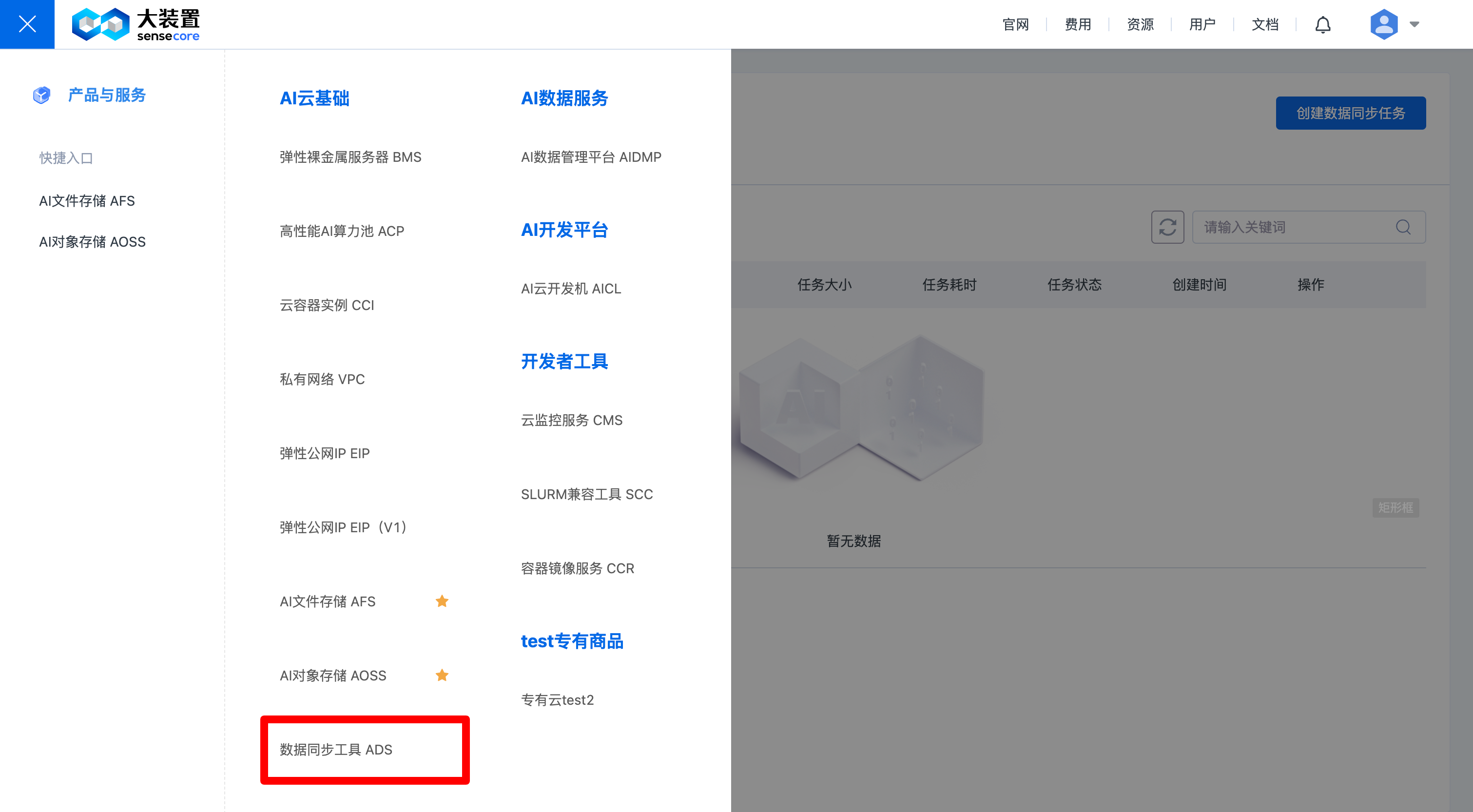
Note: If you are a tenant, you need to activate the service before using the tool for the first time of use; if you are a user, you need to apply for permissions from the tenant administrator before using the tool for the first time; if the tenant administrator has not activated the service for the time being, it is necessary for the tenant administrator to activate the service before authorizing you.
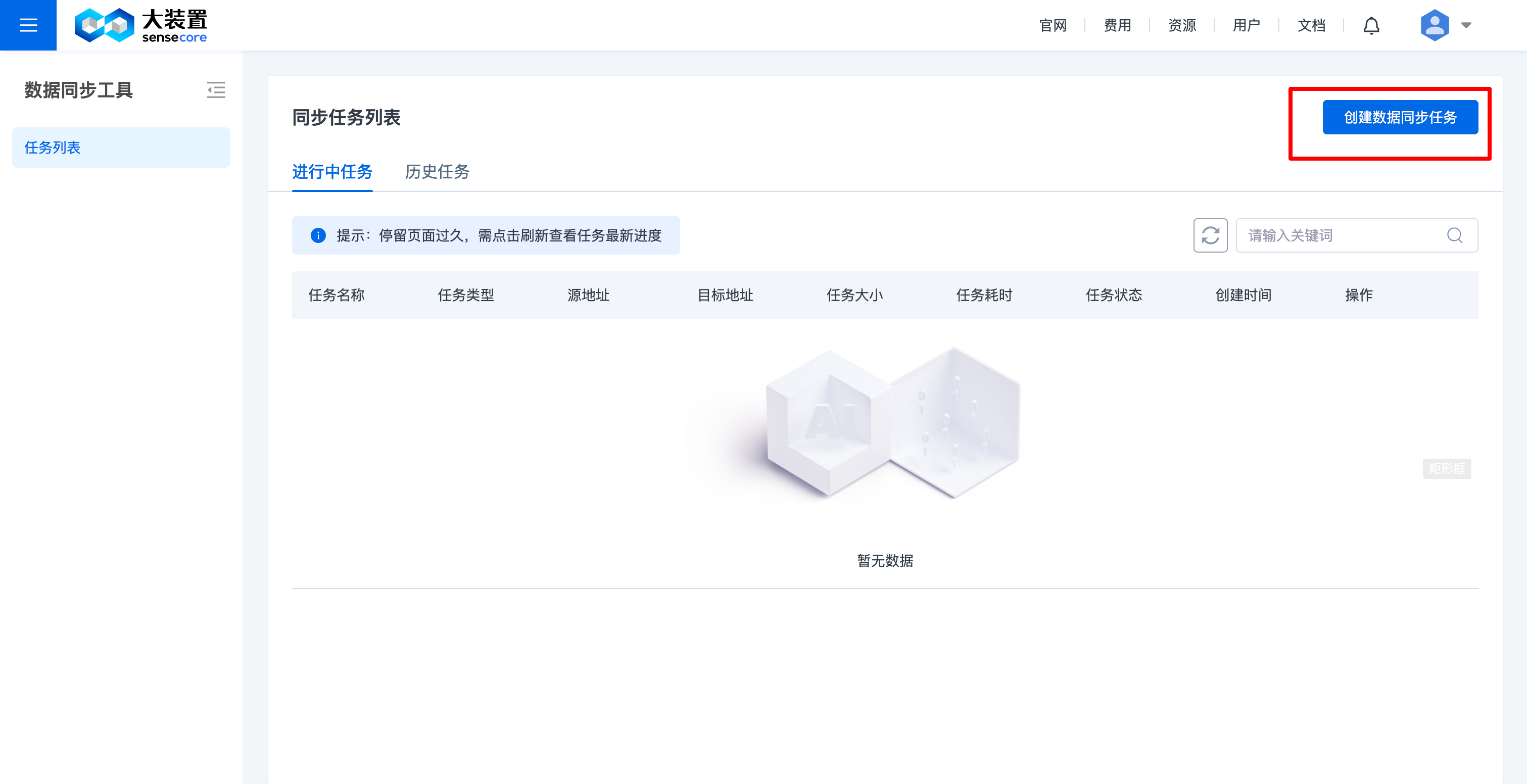
- Click [New Data Synchronization Job], which currently supports data transmission between AI object storage and AI file storage, between AI object storages, between AI file storages, from a third-party cloud to AI file storage, and from a third-party cloud to AI object storage (Please refer to “4. Transmit data from a third-party cloud to AOSS/AFS” for details)
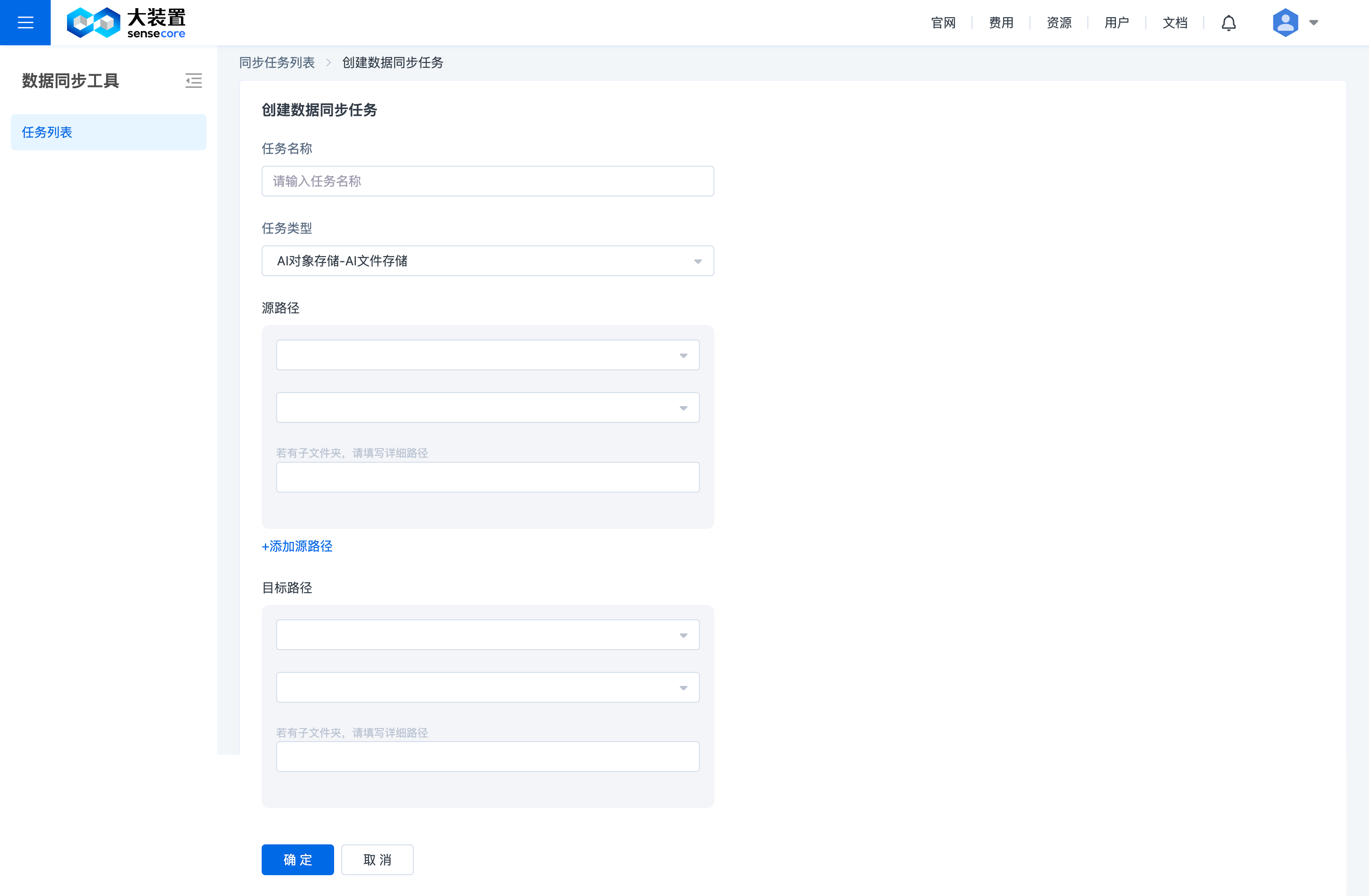
- Fill in data synchronization details
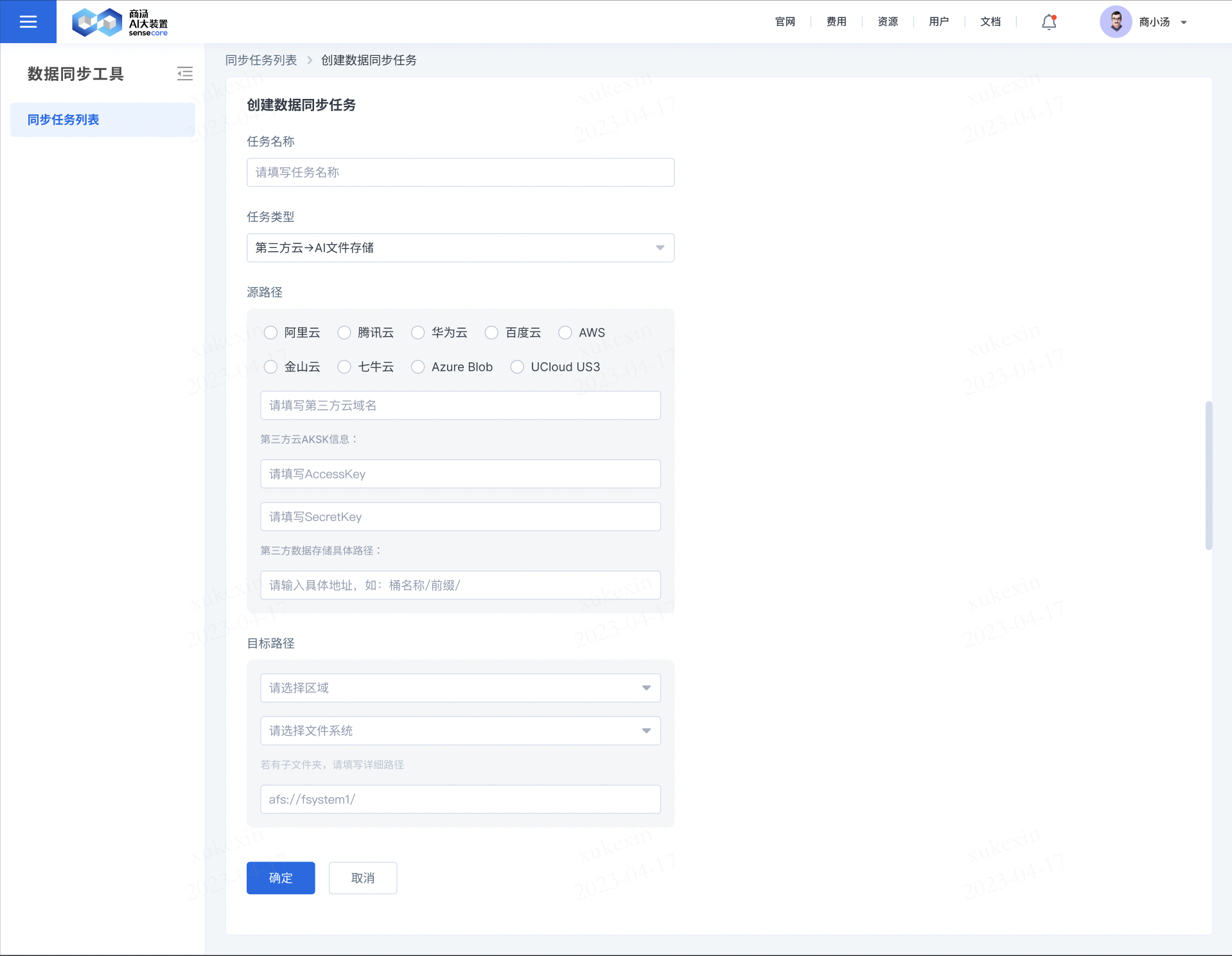
- Transmit data from a third-party cloud to AOSS/AFS
- Click [New Data Synchronization Job]
- Select [Third-party Cloud -> AI Object Storage] or [Third-party Cloud -> AI File Storage] as the job type
- Select the name of the third-party cloud
- Fill in the domain name of the third-party cloud, for example: oss-cn-beijing.aliyuncs.com (Refer to the Internet access address of the third-party cloud)
- SecretKey and SecretKey entry: Enter the cloud API key used for migration. It is recommended to create a new key for the migration service and delete the key after completing the migration.
- [Specific path for third-party data storage], if you need to transfer the entire bucket, fill in [Bucket Name/] without the need to fill in a prefix; if only a part of the data is migrated, the format must end with a forward slash (/), e.g., folder1/abc/sss/
Details about Regular Expressions Matching the Data Migration Tool
SenseSync supports regular expressions in the following range:
| Command | Range |
|---|---|
| --include | Files (objects) to be included |
| --exclude | Files (objects) to be excluded |
This directory tree is the source directory for the migration action:
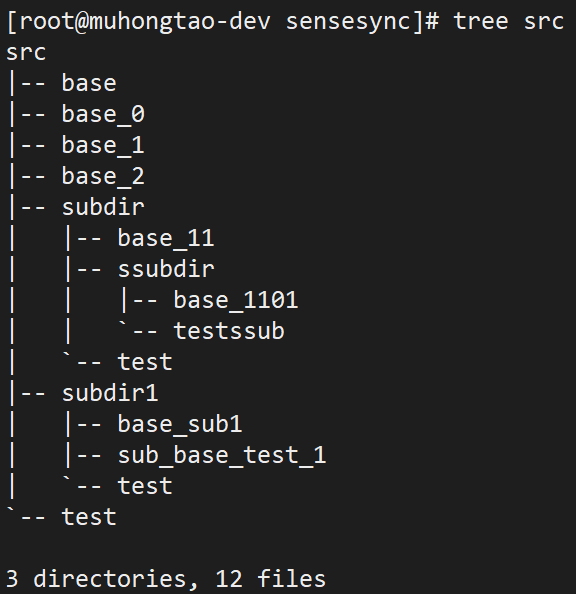
Examples of --include:
Migrate objects containing base keywords:
--include "base"
Result:
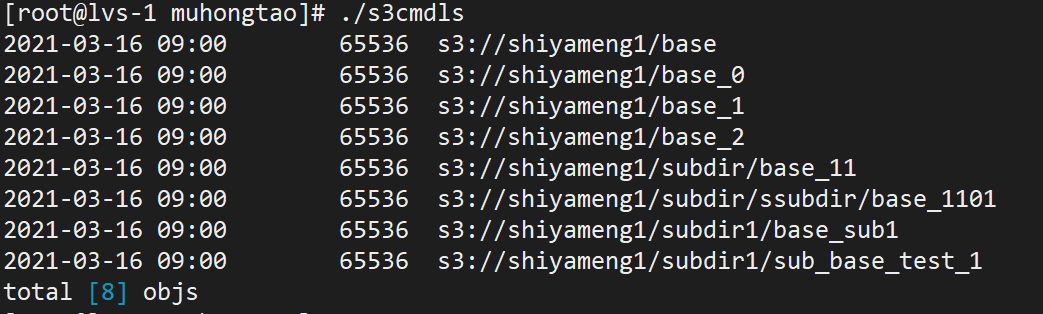
Migrate objects prefixed with base keywords:
--include "^base"
Result:
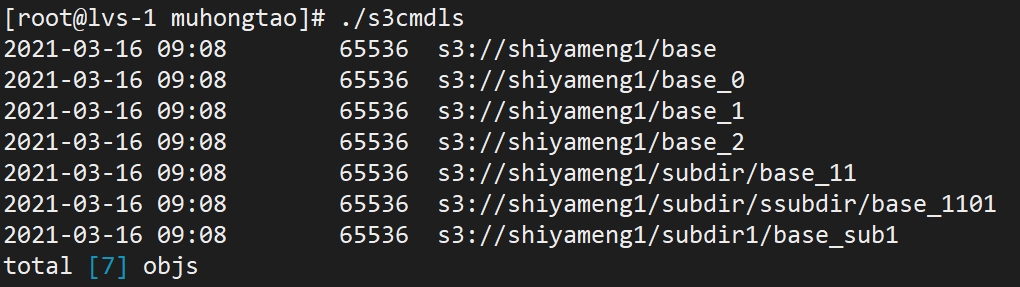
Migrate objects only containing base keywords:
--include "^base$"
Result:

Migrate objects ending with keyword 1:
--include "1$"
Result:
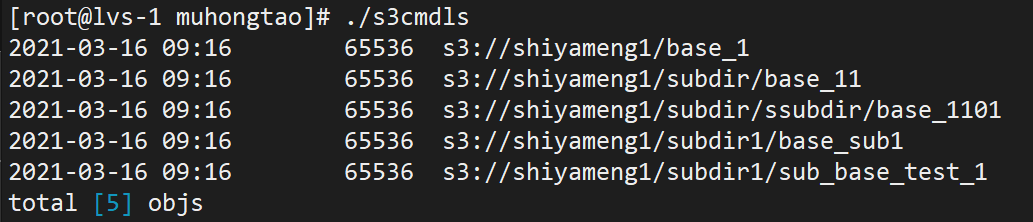
Examples of --exclude:
Exclude objects containing base keywords:
--exclude "base"
Result:

Exclude objects prefixed with base keywords:
--exclude "^base"
Result:
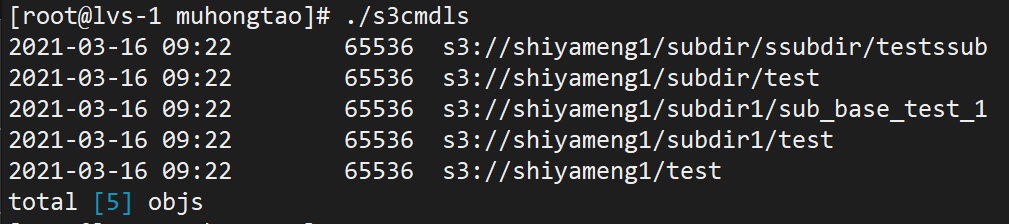
Exclude objects only containing base keywords:
--exclude ”^base$“
Result:
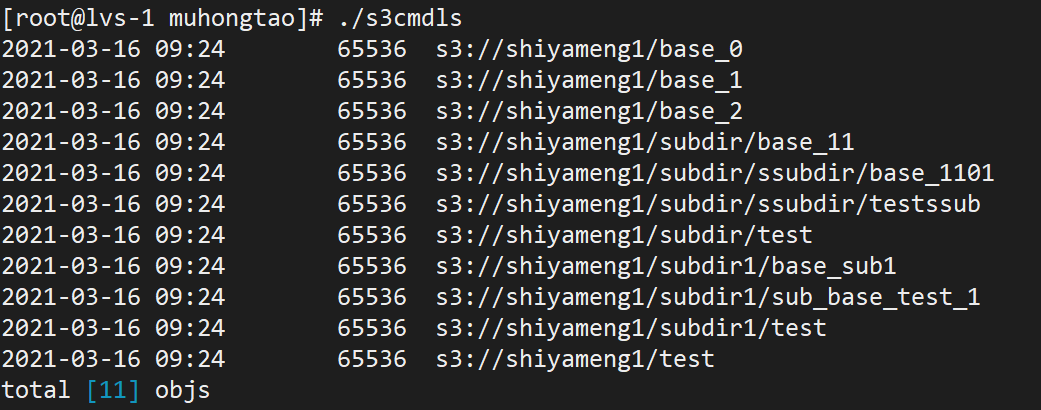
Exclude objects ending with keyword 1:
--exclude "1$"
Result:
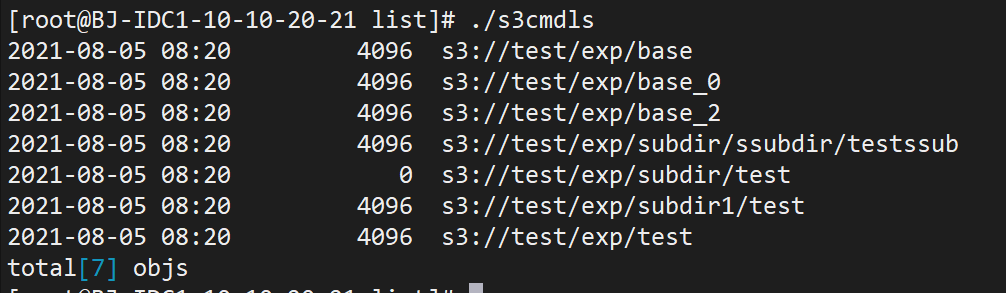
FAQ
What is AI DataSync Service (ADS)
AI DataSync Service (ADS) is a data migration tool for users to perform data synchronization and migration conveniently and quickly.
Is there an upper limit to the number of data migration jobs?
No.
Why can’t I successfully transfer a file/group of files? For example: 0 Scanned appears
A: Please confirm the—-include solution, refer to the ADS Help Documentation [Details about regular expression matching of data migration tools] section for details.